How to Manage Multiple Social Media Accounts: A Practical Guide for Businesses

Table of Contents
Managing social media for your business can get complicated pretty quickly.
One minute, you’re planning LinkedIn posts for your company page. Next, you’re responding to Instagram comments, preparing Facebook updates, and figuring out what to publish on TikTok.
Before you know it, half your day is gone, and you still have a few accounts to take care of.
Sound familiar?
It’s a common challenge for businesses that rely on multiple social platforms to reach customers, promote products, and build brand awareness. The same goes for marketing teams and agencies handling different brands, each with its own audience, goals, and content requirements. Keeping everything organized takes more than a few spreadsheets and good intentions.
The opportunity, however, is worth the effort. According to DataReportal’s Digital 2026 Global Overview Report, there were 5.66 billion social media user identities worldwide in October 2025, equivalent to 68.7% of the global population. These identities don’t necessarily represent unique individuals, but the figures highlight the scale of the opportunity for businesses looking to connect with their audiences.
The challenge is turning that opportunity into results without overwhelming your team. You need fresh content, consistent messaging, timely responses, and a publishing schedule that doesn’t fall apart when things get busy.
The good news? You don’t have to work around the clock to keep every account running smoothly. With a clear strategy, a well-organized social media content calendar, and a repeatable workflow, you can manage multiple social media accounts efficiently while keeping your marketing efforts focused on business goals.
So, where should you start? Let’s look at nine practical ways to simplify your workflow, keep your accounts organized, and make social media management for multiple clients less time-consuming.
Why Is Managing Multiple Social Media Accounts So Challenging?
Every social platform has its own audience, content formats, and unwritten rules. LinkedIn favors professional insights and industry conversations, Instagram leans heavily on visual storytelling, and TikTok rewards engaging short-form videos.
Now imagine creating content for several brands across all three platforms while keeping every account aligned with its goals.
That’s a lot of balls to keep in the air.
Here are some common challenges businesses and marketing teams face:
- Constant context switching: Jumping between platforms, browser tabs, and client accounts breaks your concentration.
- Inconsistent brand messaging: Different contributors may use different tones, visuals, or messaging.
- Last-minute publishing: Without a clear calendar, deadlines and campaign opportunities can slip through the cracks.
- Limited audience engagement: Content creation takes priority, leaving little time to respond to comments and messages.
- Scattered performance data: Reviewing each account separately makes it harder to identify patterns and understand what’s working.
For agencies, these challenges become even more noticeable when several clients need content approved and published at the same time. A delayed approval for one client can disrupt the schedule, while an overlooked comment on another account can affect the customer experience.
The solution isn’t necessarily to hire more people or spend longer hours online. Instead, you need a system that helps you organize your work, prioritize the right tasks, and make every piece of content count.
9 Tips to Manage Multiple Social Media Accounts Effectively
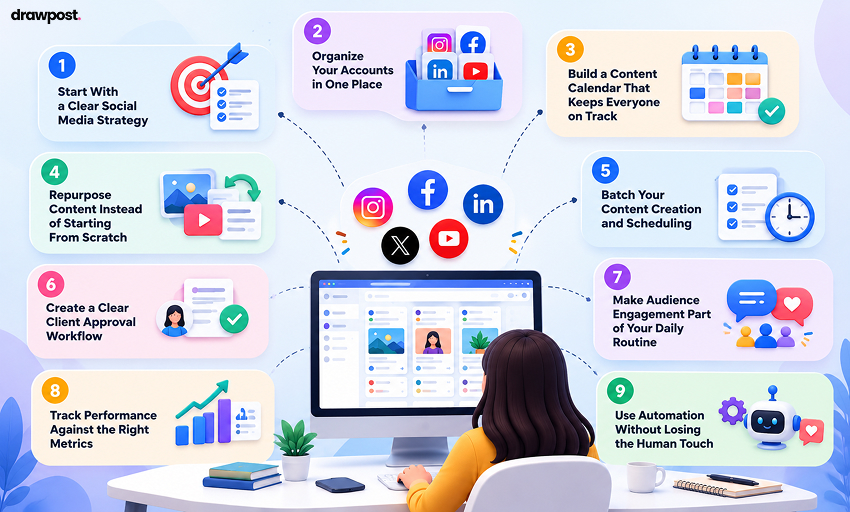
1. Start With a Clear Social Media Strategy
Before you start scheduling posts, take a step back and ask yourself a simple question: What is each account supposed to accomplish?
It sounds obvious, but many businesses maintain social media accounts simply because their competitors do. Before long, they have several profiles to manage without a clear idea of what success looks like.
To avoid that trap, define three things for every account:
- Target audience: Who are you trying to reach, and what problems can you help them solve?
- Primary objective: Are you building brand awareness, generating leads, driving sales, or supporting existing customers?
- Content direction: Which topics and formats will help you reach those goals?
For example, a B2B software company might use LinkedIn to share industry insights, Instagram to showcase company culture, and Facebook to distribute product updates and customer stories.
Although the brand remains the same, each channel serves a different purpose.
For agencies, this planning stage is particularly important. Effective social media management for agencies starts with understanding each client’s business objectives instead of applying the same strategy to every account.
Document each client’s brand voice, visual guidelines, messaging rules, and publishing standards. This gives your team a common reference point and makes it easier to maintain consistency across accounts.
2. Organize Your Accounts in One Place
If you’re constantly logging in and out of different profiles or searching through browser tabs to find the right account, you’re wasting time on administrative work.
Start by creating a master list of all your social media accounts. Include the platform, account handle, brand or client name, account owner, and publishing responsibilities.
Next, group accounts by client, brand, department, or location. For instance, a marketing agency managing eight clients could create a separate group for each client, making it easier to identify upcoming posts and outstanding tasks.
This is also where multi-account social media management becomes easier to handle. Instead of treating every profile as a separate project, create a centralized system that gives your team a clear view of its responsibilities.
You can explore tools that support multiple profiles through a single dashboard. Depending on the platform, these may help you coordinate publishing, monitor engagement, and review performance.
When evaluating tools to manage multiple client social media accounts, consider the number of profiles supported, collaboration features, permissions, and reporting capabilities. Choose a solution that fits your current workload without making everyday tasks more complicated.
The idea is simple: spend less time hunting for information and more time creating content that moves your goals forward.
3. Build a Content Calendar That Keeps Everyone on Track
Here’s the thing about social media: last-minute posting might work once or twice, but it’s a poor long-term strategy.
Without a calendar, your team can end up repeating ideas, missing important dates, or scrambling to find something to publish. A social media content calendar gives you a bird’s-eye view of upcoming posts and helps everyone understand what needs to happen next.
Start by planning two to four weeks ahead. For each post, record:
- Publishing date and time
- Social media platform and account
- Content topic and format
- Caption, creative asset, and call to action
- Assigned team member
- Approval and publishing status
Suppose you’re launching a new product. Your calendar might include a LinkedIn announcement, an Instagram Reel demonstrating its features, and a Facebook post addressing common customer questions.
Each post supports the same campaign, but the execution fits the platform.
If you’re wondering how marketing agencies manage multiple social media accounts without losing track of deadlines, a shared calendar is a good place to start. It gives account managers, writers, designers, and clients a clearer view of what’s planned and what still needs attention.
At the same time, leave room for trending topics, timely announcements, and unexpected opportunities. Your calendar should keep you organized without boxing you in.
4. Repurpose Content Instead of Starting From Scratch
Creating original content for every account can quickly become a full-time job. Fortunately, you don’t need a completely new idea every time you publish.
Instead, make one good idea work harder.
For example, a blog about improving customer retention could become:
- A LinkedIn carousel outlining five practical lessons.
- An Instagram Reel featuring one actionable tip.
- A Facebook discussion asking followers about their biggest customer retention challenges.
- A short X post highlighting the most important takeaway.
This approach allows you to get more mileage out of your existing content while maintaining a consistent message across channels.
However, repurposing isn’t the same as copying and pasting. Adapt the hook, caption, format, and call to action to each platform. A professional LinkedIn audience may appreciate detailed insights, while Instagram followers might respond better to a quick visual demonstration.
For agencies handling several brands, this approach can save considerable time. However, each client should still have a distinct content strategy, voice, and visual identity.
Think of it as telling the same story in different ways. The message stays consistent, but the delivery feels right for the audience.
5. Batch Your Content Creation and Scheduling
Ever sat down to write a single caption and somehow spent an hour jumping between unrelated tasks? That’s the trouble with trying to do everything at once.
Content batching helps you break that cycle by grouping similar activities into dedicated time blocks.
For example, you could organize your week like this:
- Monday: Research topics, brainstorm ideas, and plan upcoming campaigns.
- Tuesday: Write captions, create graphics, and prepare videos.
- Wednesday: Review content, obtain approvals, and schedule posts.
- Thursday: Respond to comments, engage with followers, and support ongoing campaigns.
- Friday: Review performance and identify improvements for the following week.
Of course, your schedule will depend on your team size, client workload, and publishing frequency. The point is to minimize unnecessary task switching.
Once you establish a routine, batching can make your workload more predictable and free up time for creative thinking.
Social media scheduling for multiple clients becomes easier when content is prepared in batches and organized by publishing date, platform, and approval status. Rather than scrambling to finish one post at a time, your team can work through a planned queue.
Just remember to review scheduled content regularly. A timely industry update or an unexpected customer issue may require you to adjust the plan.
6. Create a Clear Client Approval Workflow
If you’ve ever waited days for a client to approve a caption, you know how quickly one small delay can throw off an entire publishing schedule.
This is why agencies need a defined client approval workflow. Without one, content can sit in inboxes, feedback may get lost in chat threads, and team members may end up working on outdated versions.
To keep things moving, establish a few ground rules:
- Set clear deadlines for client feedback.
- Decide who has the final say on content.
- Share drafts and creative assets in an organized format.
- Keep feedback and revisions attached to the relevant post.
- Establish an escalation process for overdue approvals.
For example, you might agree that clients should review scheduled content at least three business days before publication. If feedback isn’t received, the account manager can follow up before the post misses its planned date.
The exact timeline will depend on the client and the type of content involved. Sensitive industries, regulated businesses, and major campaigns may need additional review.
The key is to make responsibilities clear from the outset. A well-defined process reduces confusion, avoids unnecessary revisions, and gives everyone a better chance of meeting deadlines.
7. Make Audience Engagement Part of Your Daily Routine
Publishing content is only half the job. The other half is showing up when your audience responds.
Comments, direct messages, brand mentions, and customer questions are opportunities to build relationships. Unfortunately, when you’re managing several accounts, these conversations can easily get overlooked.
To prevent that, establish a daily engagement routine.
First, check notifications and messages at consistent times. Next, prioritize urgent customer concerns, sales inquiries, and time-sensitive conversations. Finally, assign messages to the appropriate team members when an issue requires additional support.
You can also create response templates for frequently asked questions about pricing, availability, product features, or business hours.
However, don’t let those templates turn every interaction into a canned response. Personalize your replies whenever appropriate, and give people a reason to feel they’re talking to a real person.
A little genuine engagement can go a long way toward building trust and keeping your audience connected to your brand.
8. Track Performance Against the Right Metrics
Posting consistently is important, but consistency alone doesn’t tell you whether your efforts are paying off.
Your social media analytics and reporting should connect platform activity with the business outcomes you’re trying to achieve. Otherwise, it’s easy to spend hours producing content without knowing whether it’s helping.
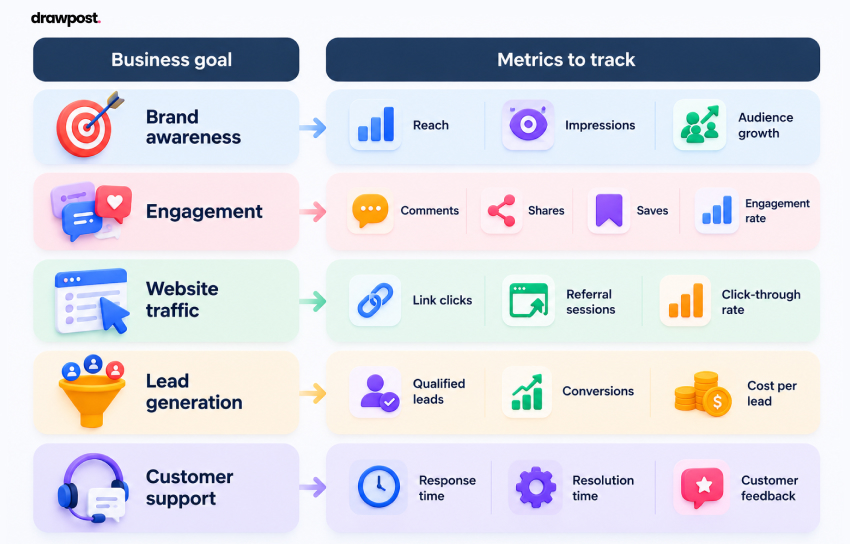
Start by matching your metrics to your goals:
| Business goal | Metrics to track |
| Brand awareness | Reach, impressions, audience growth |
| Engagement | Comments, shares, saves, engagement rate |
| Website traffic | Link clicks, referral sessions, click-through rate |
| Lead generation | Qualified leads, conversions, cost per lead |
| Customer support | Response time, resolution time, customer feedback |
Don’t compare every account against the same benchmark. A LinkedIn page focused on B2B lead generation will have different priorities from an Instagram account designed to build a consumer community.
Review your results weekly for quick adjustments and monthly for broader trends. Then ask yourself: What worked? What fell short? What should we change next?
For agencies, consistent reporting also makes client conversations more productive. Instead of simply sharing follower counts, you can explain which content formats generated engagement, which campaigns drove traffic, and where the next opportunity lies.
That way, your analytics become a practical decision-making tool rather than another report nobody has time to read.
9. Use Automation Without Losing the Human Touch
When you’re handling several accounts, repetitive tasks can eat into the time you need for strategy and creative work. That’s where social media automation can help.
Depending on the tools you use, you may be able to automate routine publishing, schedule reminders, organize notifications, or generate recurring reports.
However, automation works best when it supports a well-defined process. It shouldn’t replace human judgment or leave your accounts running unattended.
For example, scheduling evergreen content in advance can free up time for your team. Automatically posting a promotional message during a sensitive news event, on the other hand, could create an avoidable problem.
Keep these safeguards in mind:
- Review scheduled posts before publication.
- Check automated workflows regularly.
- Maintain appropriate access permissions for team members.
- Monitor comments and messages that need a human response.
- Pause or revise content when circumstances change.
The goal isn’t to automate every task. It’s to remove repetitive work so your team can focus on creative decisions, meaningful conversations, and stronger client relationships.
Bring Your Social Media Planning Together With Drawpost
Managing several accounts gets easier when your content ideas, publishing schedule, and marketing priorities work together. You can plan ahead, repurpose content, and keep track of upcoming campaigns without spending half the day figuring out what needs to happen next.
That’s where a well-organized calendar makes a difference.
The best way to manage social media for multiple clients is to build a repeatable process that gives everyone a clear view of upcoming content, deadlines, and priorities. Organize ideas by brand, map out campaigns, set realistic timelines, and leave enough flexibility to respond to new opportunities.
If you’re looking for a practical starting point, Drawpost can help you explore a more organized approach to content planning. Visit drawpost.app to see how it fits into your workflow and how you can bring more structure to your social media planning.
Because managing several accounts shouldn’t mean sacrificing creativity, consistency, or your sanity. Build a smarter planning routine and let Drawpost help you curate your calendar in a jiffy.
Our Latest Insights

Social Media Scheduling: 9 Best Practices for Brands and Agencies
Discover 9 social media scheduling best practices for brands and agencies, from content calendars and approvals to cross-platform publishing and automation.
How to Generate 30 Days of Social Media Content in 30 Minutes With AI
Learn how to plan 30 days of social media content in 30 minutes with AI. Discover time-saving strategies, content calendars, and tools like DrawPost.

What Is an AI Social Media Manager? How It Works in 2026-2027
Learn what an AI social media manager is, how it works, its key features, benefits, and challenges, and how businesses use AI to manage social media.