
Table of Contents
Every new client brings more revenue to your agency. But it also means more content calendars, design requests, approval rounds, and performance reports. As your client list grows, keeping up with all that work can become expensive, especially when your team relies on different tools for each task.
The best AI social media management tools for agencies help solve this problem. They can create branded content, automate publishing, manage client accounts, and track campaign results. Some even help your team handle content production without adding more staff.
However, choosing the right platform isn’t just about finding the most advanced AI features. You need software that fits your agency’s workflow, supports multiple clients, and stays affordable as you grow.
This guide compares the top 10 AI social media management tools for agencies in 2027, including their features, pros, cons, pricing, and ideal use cases. You’ll also learn what to look for before investing in a platform.
10 Best AI Social Media Management Tools for Agencies at a Glance
The right tool depends on how your agency works. Some platforms focus on creating content, while others are stronger in analytics, client approvals, or community management.
Here’s a quick comparison to help you narrow down your options.
| Tool | Best for | Indicative starting price |
| DrawPost AI | AI content creation and multi-client management | Free; paid from $25/month |
| Cloud Campaign | Client approvals and agency workflows | From $49/month |
| Hootsuite | Large-scale social account management | From $99/user/month |
| Sprout Social | Advanced analytics and social listening | From $79/user/month |
| Buffer | Simple scheduling and content repurposing | Free; paid from $5/channel/month |
| SocialPilot | Affordable multi-client management | From about $30/month |
| Sendible | Team collaboration and publishing | From $35/month |
| Agorapulse | Community management and engagement | From $79/user/month |
| Metricool | Analytics and competitor tracking | Free; paid from $20/month |
| Later | Instagram and visual content planning | From about $25/month |
Pricing is based on publicly listed or supplied 2026 rates. These are not confirmed 2027 prices. Some starting prices require annual billing, and plan features may change.
1. DrawPost AI: Best for AI-Powered Content Creation and Multi-Client Management
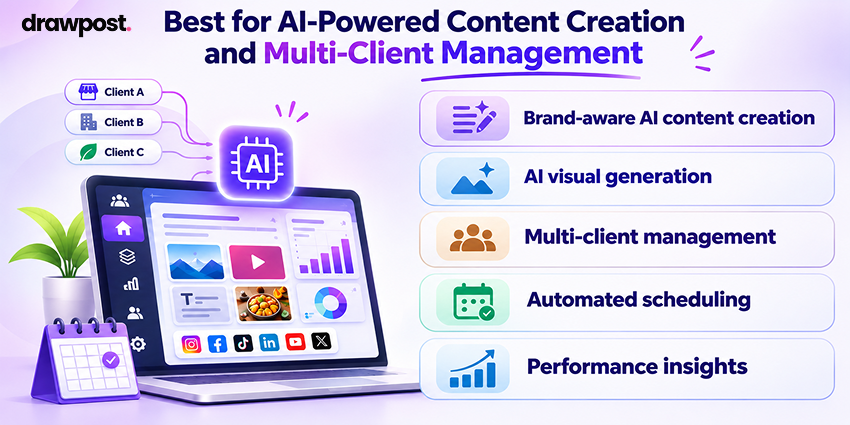
DrawPost AI is an AI-powered social media management platform that helps agencies create, schedule, and manage content for multiple brands from one dashboard.
Rather than starting with a blank prompt each time, DrawPost uses a client’s website to understand its brand voice, visual style, and business context. It then helps generate captions, images, carousels, and videos that match the brand.
This approach can be useful for agencies working with clients across different industries. Each brand can have its own content direction and publishing calendar, reducing the need to rebuild content plans from scratch.
DrawPost also offers an Autopilot feature for content creation and scheduling. Its reporting tools help teams review post performance and plan future content.
Key features
- Brand-aware AI content creation: Generates content using each client’s business and brand details.
- AI visual generation: Creates social media images, carousels, and video content.
- Multi-client management: Keeps brands, social accounts, and calendars organized.
- Automated scheduling: Helps prepare and publish content across supported platforms.
- Performance insights: Tracks content results to support future planning.
Best for: Agencies that manage several brands and want to reduce the time spent creating and scheduling content.
Pros
- Generates captions and visuals within the same platform.
- Keeps separate brand identities for different clients.
- Reduces manual work involved in building content calendars.
- Offers a free plan for testing AI content generation.
Cons
- AI credits may limit content production on smaller plans.
- Advanced agency approval and white-label reporting features should be confirmed before purchase.
Pricing
- Free: $0/month, with 50 AI credits.
- Creator: $25/month, with 200 AI credits.
- Starter: $49/month, with 400 AI credits.
- Growth: $129/month, with 2,000 AI credits and multi-client management.
Verdict: DrawPost AI is worth considering if your biggest challenge is producing consistent content for multiple clients. Agencies should test its brand accuracy and credit usage before rolling it out across their entire client list.
2. Cloud Campaign: Best for Managing Agency Workflows and Client Approvals
Cloud Campaign is designed for agencies that need a structured way to manage content across several clients.
It combines AI writing tools with scheduling, approvals, content recycling, and reporting. The platform lets agencies organize client accounts into separate workspaces, making it easier to keep content and feedback in the right place.
One useful feature is its client approval workflow. Instead of collecting feedback through long email threads, account managers can send content for review within the platform.
Cloud Campaign also offers AI tools for caption writing, image generation, and social inbox replies.
Key features
- CaptionAI: Creates social media captions from prompts or existing content.
- ImageAI: Helps produce visuals for scheduled posts.
- Client approval workflows: Supports review before content goes live.
- Evergreen content recycling: Reuses approved content across future schedules.
- White-label reporting: Creates branded client reports on eligible plans.
Best for: Established agencies that need better collaboration, approvals, and reporting across multiple accounts.
Pros
- Separate workspaces keep client work organized.
- Built-in approvals reduce back-and-forth communication.
- Supports content recycling and bulk publishing.
- Unlimited-user plans can help control team costs.
Cons
- Client workspace costs can increase as the agency grows.
- White-label features may require higher plans.
- Content creation tools may not cover every advanced visual need.
Pricing
- Freelancer: From $49/month.
- Team: From $199/month.
- Agency: From $299/month.
Verdict: Cloud Campaign is a good fit when your agency needs stronger control over approvals, publishing, and reporting rather than content creation alone.
3. Hootsuite: Best for Large Agencies Managing Multiple Social Accounts
Hootsuite brings social media scheduling, engagement, analytics, and monitoring into one platform.
Its OwlyWriter AI helps teams generate captions and post ideas. Agencies can also use its publishing tools to manage content across multiple networks.
The platform is particularly useful when several employees work on the same client accounts. Managers can oversee publishing activity while team members focus on their assigned tasks.
Hootsuite also offers social listening tools that help agencies follow brand mentions and market conversations.
Key features
- OwlyWriter AI: Helps generate captions and content ideas.
- Centralized scheduling: Manages posts across several social platforms.
- Social listening: Tracks brand conversations and relevant trends.
- Team management: Supports user roles and publishing controls.
- Performance reporting: Measures results across connected accounts.
Best for: Large agencies that need centralized control over publishing, social accounts, and team activity.
Pros
- Covers scheduling, analytics, and engagement.
- Provides tools for social listening and brand monitoring.
- Supports structured team workflows.
- Useful for agencies managing a high volume of accounts.
Cons
- Per-user pricing can become expensive.
- Advanced approvals may require higher plans.
- The interface can take time to learn.
Pricing
- Standard: From approximately $99/user/month.
- Higher plans: Approximately 199–399/user/month, depending on the plan and billing terms.
- Enterprise: Custom pricing.
Verdict: Hootsuite is suitable for agencies that value account oversight and reporting. Smaller teams may find simpler platforms more cost-effective.
4. Sprout Social: Best for Advanced Analytics and Social Listening
Sprout Social is an AI social media management software platform focused on analytics, engagement, and audience insights.
For agencies serving larger brands, tracking likes and impressions may not be enough. Clients often want to understand customer conversations, audience trends, and campaign performance.
Sprout Social helps teams collect these insights through reporting and social listening tools. Its AI features also support content creation and message management.
The platform is particularly useful when reporting and social customer care form a major part of an agency’s service.
Key features
- AI Assist: Supports caption writing and response suggestions.
- Social listening: Tracks brand mentions and audience conversations.
- Advanced reporting: Provides detailed performance insights.
- Smart Inbox: Helps manage incoming social messages.
- Publishing recommendations: Helps teams choose suitable posting times.
Best for: Enterprise-focused agencies that need detailed analytics, social listening, and customer engagement tools.
Pros
- Strong reporting capabilities for client presentations.
- Social listening provides useful audience insights.
- Centralized inbox helps manage customer conversations.
- Supports teams handling complex social media operations.
Cons
- Costs increase with each additional user.
- Advanced analytics and listening may require extra investment.
- Smaller agencies may not use enough features to justify the price.
Pricing
- Essentials: From approximately $79/user/month.
- Professional: Around $299/user/month.
- Advanced: Around $399/user/month.
- Enterprise: Custom pricing.
Verdict: Sprout Social is a strong choice for agencies that sell advanced reporting and social intelligence as part of their services.
5. Buffer: Best for Simple Social Media Scheduling
Buffer is one of the more straightforward social media management tools for agencies that want to plan and schedule content without a complex setup.
Its AI Assistant helps writers generate ideas and adapt existing posts for different social channels. For example, a team can turn a longer LinkedIn post into a shorter Instagram caption without writing everything again.
Buffer also offers a visual publishing calendar and tools for organizing content ideas.
Its simple approach works well for freelancers and smaller agencies. However, pricing is based on connected channels, which can become costly as the number of client accounts increases.
Key features
- AI Assistant: Writes and repurposes social content.
- Content scheduling: Plans posts across supported social networks.
- Idea management: Saves draft ideas for future campaigns.
- Publishing calendar: Shows scheduled content in one place.
- Basic analytics: Tracks post and channel performance.
Best for: Freelancers and small agencies that need affordable scheduling and basic AI writing support.
Pros
- Easy to learn and use.
- Offers a free plan.
- Helps repurpose content for different platforms.
- Good for teams managing a limited number of channels.
Cons
- Per-channel pricing increases with account volume.
- Limited advanced agency reporting features.
- Not ideal for complex multi-client management.
Pricing
- Free: $0/month for up to three channels, with limits.
- Essentials: From $5/channel/month, billed annually.
- Team: From $10/channel/month, billed annually.
Verdict: Buffer is a practical option for agencies that need simple scheduling. For larger client portfolios, compare the total channel cost before subscribing.
6. SocialPilot: Best for Affordable Multi-Client Social Media Management
SocialPilot provides scheduling, collaboration, approvals, and reporting tools for agencies that want to manage clients without paying enterprise-level prices.
Its AI Pilot feature can generate captions and variations for social posts. Agencies can also schedule content in bulk, organize client accounts, and share reports.
This makes SocialPilot useful for growing agencies that need more than a basic scheduler but aren’t ready for an expensive enterprise platform.
However, user and account limits depend on the selected plan.
Key features
- AI Pilot: Generates social captions and post variations.
- Bulk scheduling: Uploads and schedules multiple posts.
- Client approvals: Supports review workflows on eligible plans.
- White-label reporting: Creates client-branded performance reports.
- Social account groups: Helps organize different client profiles.
Best for: Small and mid-sized agencies looking for affordable social media scheduling and client management.
Pros
- Offers useful agency features at competitive prices.
- Bulk scheduling supports high-volume publishing.
- White-label reporting is available on selected plans.
- Helps teams organize multiple client accounts.
Cons
- Social account limits vary by plan.
- AI features may have usage restrictions.
- Additional users or accounts can increase costs.
Pricing
- Entry plans: Approximately 30–50/month.
- Premium: Around $100/month.
- Ultimate: Around $200/month.
Verdict: SocialPilot offers a practical balance of agency features and pricing. It suits teams that need approvals and reporting without a large software budget.
7. Sendible: Best for Team Collaboration Across Client Accounts
Sendible helps agencies manage social media content, publishing, and client collaboration from one place.
Its AI Assist tool supports caption writing and content editing. Agencies can also organize connected accounts into workspaces, making it easier to separate clients and assign work.
Sendible is useful when several employees handle publishing across many profiles. Its plans also support different agency sizes, although workspaces and social profile limits vary.
Key features
- AI Assist: Helps write and improve social media captions.
- Content scheduling: Supports publishing across multiple networks.
- Client workspaces: Organizes content and accounts.
- Team collaboration: Helps coordinate content production.
- Performance reporting: Creates reports on social activity.
Best for: Agencies with multiple team members managing a wide range of client accounts.
Pros
- Supports collaborative publishing workflows.
- Offers several plans for different agency sizes.
- Combines AI writing with scheduling.
- Helps organize client accounts into workspaces.
Cons
- Profile and workspace limits may require upgrades.
- White-label features can involve additional costs.
- Advanced agency features may not be included in entry plans.
Pricing
- Core: From $35/month.
- Plus: From $99/month.
- Premium: From $199/month.
- Elite: From $299/month.
- Enterprise: From $750/month.
Verdict: Sendible is worth considering when content collaboration is a daily challenge and several team members need access to client accounts.
8. Agorapulse: Best for Managing Comments, Messages, and Engagement
Agorapulse focuses on social publishing and engagement management.
Many agencies spend as much time responding to comments and customer messages as they do creating content. Agorapulse helps organize this work through a unified inbox.
Teams can track conversations, manage replies, and monitor social activity without switching between several platforms.
Its AI writing features also support social post creation, but its engagement tools remain a major reason to consider it.
Key features
- Unified inbox: Manages comments and messages in one place.
- AI writing assistant: Helps create and improve captions.
- Social publishing: Supports post planning and scheduling.
- Engagement reporting: Tracks audience interactions.
- Review management: Helps teams handle customer reviews.
Best for: Agencies that provide community management, customer engagement, or reputation management services.
Pros
- Centralizes social conversations.
- Helps teams respond to messages more efficiently.
- Supports reporting on audience engagement.
- Useful for agencies handling customer service work.
Cons
- Per-user pricing increases team costs.
- Additional profiles may require extra fees.
- Less focused on advanced AI image or video creation.
Pricing
- Standard: From $79/user/month.
- Professional: From $119/user/month.
- Advanced: From $149/user/month.
- Custom plans may be available for larger teams.
Verdict: Agorapulse is a strong option for agencies where social engagement and customer communication take priority over content generation.
9. Metricool: Best for Affordable Social Media Analytics
Metricool combines social media scheduling, AI writing assistance, and performance analytics.
It is especially useful for agencies that need to measure campaign results without paying for premium reporting software.
Teams can track social performance and review competitor activity. This information can help account managers prepare client reports and identify which content performs best.
Metricool also offers brand-based plans, making it worth comparing with per-user and per-channel alternatives.
Key features
- AI writing assistant: Helps create social media captions.
- Analytics dashboard: Tracks performance across connected accounts.
- Competitor tracking: Compares selected social profiles.
- Content scheduling: Plans and publishes posts.
- Brand management: Organizes accounts for different brands.
Best for: Budget-conscious agencies that prioritize analytics and performance reporting.
Pros
- Offers useful analytics at a relatively low cost.
- Free plan available.
- Supports competitor tracking.
- Brand-based pricing may suit multi-client teams.
Cons
- Some networks require paid add-ons.
- Advanced collaboration features require higher plans.
- White-label reporting options are more limited than specialist agency tools.
Pricing
- Free: $0/month.
- Starter: From $20/month, billed annually.
- Advanced: From $53/month, billed annually.
- Higher brand limits and add-ons may increase the price.
Verdict: Metricool is a sensible option for agencies that want strong reporting tools without a high monthly subscription.
10. Later: Best for Visual Content and Instagram-Focused Agencies
Later helps brands plan, schedule, and manage visual social media content.
Its visual content calendar is useful for agencies working with lifestyle, fashion, beauty, travel, and ecommerce brands. Teams can see how upcoming posts fit together before publishing.
Later also provides AI caption assistance and scheduling features, making it easier to prepare content for visual social platforms.
While it works well for content planning, agencies managing many clients may find its account and publishing limits restrictive.
Key features
- Visual content calendar: Helps organize upcoming posts.
- AI caption writing: Assists with social media copy.
- Post scheduling: Supports publishing to major social channels.
- Media organization: Keeps visual assets ready for posting.
- Performance analytics: Tracks content results.
Best for: Agencies working mainly with Instagram and visual-first brands.
Pros
- Useful visual planning tools.
- Supports Instagram-focused content workflows.
- AI caption writing reduces manual effort.
- A simple calendar makes content review easier.
Cons
- Publishing limits vary by plan.
- Less suited to complex client approval workflows.
- Limited advanced white-label reporting options.
Pricing
- Starter: From approximately $25/month.
- Growth: From approximately $50/month.
- Scale: From approximately $110/month.
Verdict: Later works well for agencies managing visual brands. Teams handling many clients or complex approvals may need a more specialized platform.
How to Choose the Best AI Social Media Management Software for Your Agency
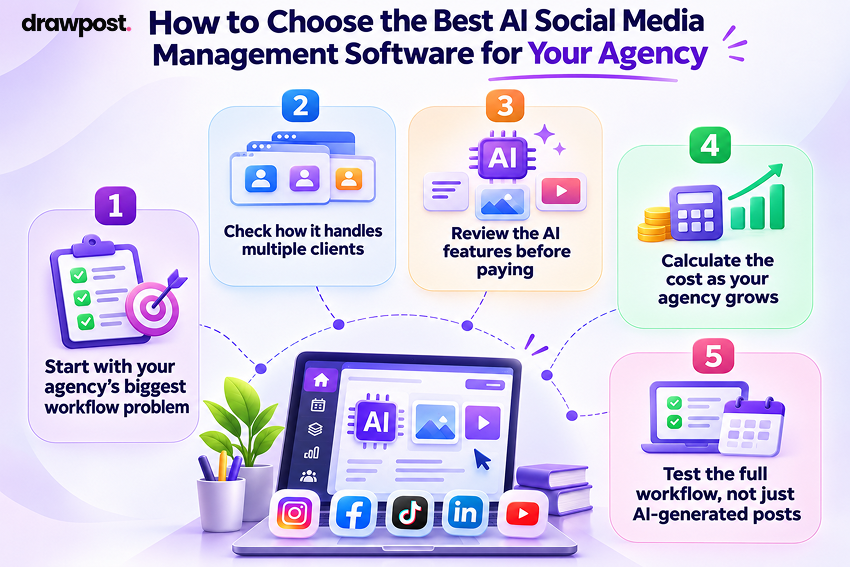
Not every agency needs the same tools. A content-focused agency may need advanced AI generation, while a firm offering community management may value inbox features more.
Before choosing software, consider the following factors.
1. Start with your agency’s biggest workflow problem
Identify where your team spends the most time.
- Content creation: Look at DrawPost AI or tools with strong writing and design features.
- Client approvals: Compare Cloud Campaign and SocialPilot.
- Detailed reporting: Evaluate Sprout Social and Metricool.
- Community management: Consider Agorapulse.
- Basic scheduling: Buffer may be enough.
Choosing software around your main problem helps avoid paying for features your team rarely uses.
2. Check how it handles multiple clients
Good social media tools for managing multiple clients should make it easy to separate accounts, content, brand guidelines, and access permissions.
Look for tools that allow your team to manage clients without mixing content between brands.
3. Review the AI features before paying
Not every AI feature delivers the same value.
Some tools only generate captions. Others can create visuals, suggest content plans, or help automate recurring tasks.
Test the output with your own client examples. Check how much editing is needed before the content is ready to publish.
4. Calculate the cost as your agency grows
A low starting price doesn’t always mean lower long-term costs.
Compare pricing based on:
- Number of clients or brands.
- Social accounts per client.
- Number of team members.
- Monthly AI credits.
- Approval and reporting features.
- Extra account or workspace fees.
For example, an agency with five clients may find a per-channel plan affordable. The same pricing model may become less attractive at thirty clients.
5. Test the full workflow, not just AI-generated posts
A short trial should show how the tool performs during normal agency work.
Try building a content calendar for one client. Create the posts, review them, schedule publishing, and prepare a report.
This makes it easier to see whether the platform saves time across the entire process.
What Features Matter Most in AI Social Media Tools for Agencies?
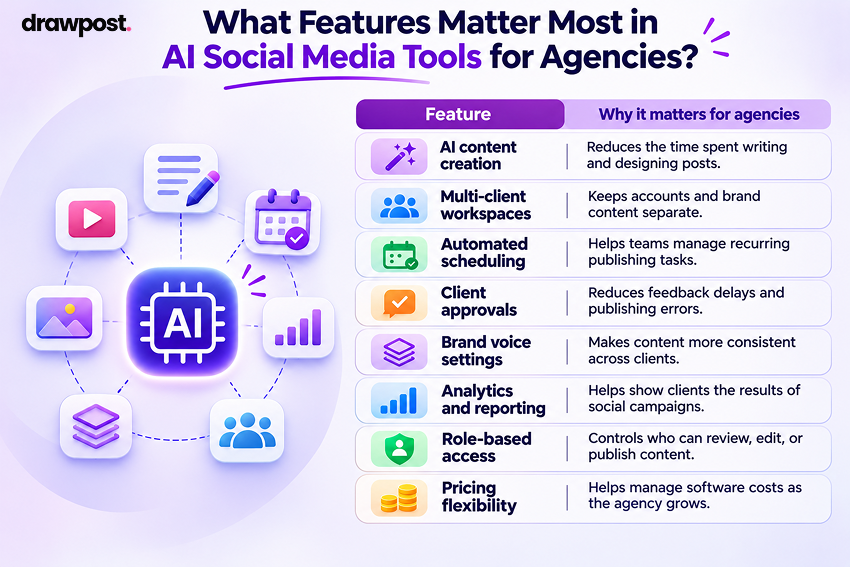
The most useful features are those that reduce repeat work while keeping clients and team members organized.
| Feature | Why it matters for agencies |
| AI content creation | Reduces the time spent writing and designing posts |
| Multi-client workspaces | Keeps accounts and brand content separate |
| Automated scheduling | Helps teams manage recurring publishing tasks |
| Client approvals | Reduces feedback delays and publishing errors |
| Brand voice settings | Makes content more consistent across clients |
| Analytics and reporting | Helps show clients the results of social campaigns |
| Role-based access | Controls who can review, edit, or publish content |
| Pricing flexibility | Helps manage software costs as the agency grows |
Agencies should focus on the features they use every week. A platform with fewer features may offer more value if it handles your daily tasks well.
Hidden Costs to Consider Before Choosing an AI Social Media Tool
The advertised monthly price is only one part of the total cost.
For agencies, pricing usually becomes more important as client accounts and team members increase.
Common costs include:
- Per-user fees: Each new team member increases the monthly subscription.
- Per-channel fees: Costs rise when clients add more social accounts.
- AI credit limits: Agencies may need extra credits for high-volume content production.
- Premium reporting: White-label reports may require an upgrade.
- Approval workflows: Some platforms reserve client approvals for higher plans.
- Additional workspaces: Managing more client brands may increase costs.
Consider your current client list and the number of accounts you expect to manage over the next year.
A platform should support growth without making each new client unnecessarily expensive to serve.
Final Thoughts
The best AI social media management tool is the one that helps your agency deliver better work without adding unnecessary complexity.
For agencies that spend most of their time creating posts, visuals, and content calendars, DrawPost AI offers a useful combination of AI content creation and multi-client management.
Cloud Campaign and SocialPilot are worth comparing when approvals and agency workflows matter most. Sprout Social and Metricool are better suited to reporting-focused teams, while Agorapulse supports agencies handling large volumes of social engagement.
Before making a decision, test how each platform handles your actual client work. Look beyond AI-generated captions and consider the time spent on planning, approvals, publishing, and reporting.
The right investment should help your agency manage more clients while maintaining content quality and control.
Frequently Asked Questions
Q. What are the best AI social media management tools for agencies?
Some of the best AI social media management tools for agencies include DrawPost AI, Cloud Campaign, Hootsuite, Sprout Social, Buffer, SocialPilot, Sendible, Agorapulse, Metricool, and Later. The right choice depends on your budget, client volume, content needs, and reporting requirements.
Q. How can AI social media tools help agencies manage multiple clients?
AI tools help agencies create content faster, organize client accounts, schedule posts, and review campaign results. Platforms with separate client workspaces can also reduce confusion between brands and help teams manage a larger client list.
Q. Can AI fully automate social media management for agencies?
AI can automate several tasks, including draft creation, scheduling, and basic reporting. However, agencies should still review content for accuracy, client requirements, brand tone, and sensitive claims. Human oversight is especially important for public replies and major campaigns.
Q. How much do AI social media management tools cost?
Some AI social media tools offer free plans, while paid subscriptions may start around $5 per channel or 20–50 per month. Advanced agency and enterprise platforms can cost hundreds of dollars per month. The final price depends on users, social accounts, AI usage, and plan features.
Q. What should agencies look for in AI social media management software?
Agencies should prioritize multi-client account management, AI content creation, scheduling, approvals, analytics, and predictable pricing. Choose features based on how your team works rather than the number of tools advertised.
Q. Are AI social media management tools suitable for small agencies?
Yes. Small agencies can use AI tools to create content, plan campaigns, and manage social accounts without adding more manual work. DrawPost AI, Buffer, SocialPilot, and Metricool are among the options worth evaluating based on the work your agency handles.
Q. What is the difference between an AI post generator and an AI social media management platform?
An AI post generator mainly creates content such as captions or images. An AI social media management platform goes further by supporting scheduling, account management, team collaboration, and reporting. Agencies often benefit from having these capabilities in one system.
Our Latest Insights

How Small Businesses Can Automate Social Media Without Hiring a Full Team
Learn how small businesses can use AI and social media automation to create content, schedule posts, and grow online without hiring a full marketing team.

Social Media Scheduling: 9 Best Practices for Brands and Agencies
Discover 9 social media scheduling best practices for brands and agencies, from content calendars and approvals to cross-platform publishing and automation.

How to Manage Multiple Social Media Accounts: A Practical Guide for Businesses
Learn how to manage multiple social media accounts with smarter content planning, scheduling, automation, and analytics to save time and stay organized.