How Small Businesses Can Automate Social Media Without Hiring a Full Team
Table of Contents
Key Takeaways
- Social media automation helps small businesses manage content creation, scheduling, publishing, and performance tracking without hiring a full marketing team.
- AI-powered tools reduce the time spent writing captions, designing visuals, planning content, and managing multiple social media accounts.
- A structured content calendar and automated publishing help businesses maintain a consistent online presence without daily manual effort.
- Social media automation offers a cost-effective alternative to hiring multiple marketing specialists, while keeping brand strategy and customer relationships in human hands.
- Platforms like DrawPost combine AI content generation, brand-specific content planning, automated scheduling, and analytics in one workflow.
Running a small business means making tough decisions about where your time and money go. Social media is one of them.
You know your business needs an online presence. Customers expect regular updates, useful content, and timely responses. But between managing operations, serving customers, and generating revenue, finding time to create another Instagram post isn’t always realistic.
Hiring a social media manager sounds reasonable until you consider the cost. Add a graphic designer, content writer, and marketing strategist, and suddenly maintaining your online presence becomes a significant monthly expense. That’s where social media automation for small businesses changes the equation.
Modern AI-powered tools can help you plan content, create visuals, write captions, schedule posts, and track performance without building an entire marketing department. The opportunity isn’t to remove people from marketing. It’s to eliminate repetitive work so you can spend more time on decisions that grow your business.
Here’s how to make that shift.
Why Does Social Media Management Feel Like a Full-Time Job for Small Businesses?
Social media often looks simple from the outside. Create something interesting, publish it, and engage with your audience. In practice, every post involves several decisions. What should you talk about? Which platform should you use? Do you need an image or video? What should the caption say? When should it go live?
Now multiply those decisions across multiple platforms and several weeks. For a business owner already managing customers, inventory, employees, or service delivery, social media becomes another demanding responsibility.
Too Many Marketing Tasks, Not Enough Time
Consider a small fitness studio preparing content for the coming week. The owner wants to promote a new membership offer, share a client success story, highlight an upcoming class, and publish fitness tips. Each idea requires copy, visuals, formatting, scheduling, and possibly revisions.
Even when the content is relatively straightforward, switching between design software, writing tools, and social media platforms creates unnecessary friction. This is where small business social media automation becomes valuable. Instead of manually completing every task, owners can establish a repeatable process that handles much of the production and publishing work.
Hiring a Dedicated Marketing Team Isn’t Always Affordable
A larger organization may have specialists responsible for content strategy, copywriting, design, publishing, and handling analytics. Most small businesses don’t have that luxury.
Hiring even one dedicated marketing employee creates a recurring financial commitment. Freelancers and agencies offer alternatives, but managing multiple providers can introduce additional coordination, revisions, and delays.
The real question becomes whether every marketing activity requires a separate specialist. For routine content production and scheduling, increasingly capable software offers another option.
Inconsistent Posting Makes Growth Harder
When social media depends entirely on an owner’s availability, publishing often becomes irregular.
A busy week turns into two weeks without updates. Promotions get announced late. Useful customer questions never become content. Campaign ideas remain unfinished because there’s no time to execute them.
Consistency doesn’t guarantee audience growth. However, an unreliable publishing process makes it harder to test content, understand audience preferences, and maintain visibility. Small businesses need a system that works even when the owner is busy running the business.
Can Social Media Automation Replace a Full Marketing Team?
For routine social media execution, automation can reduce the need for several dedicated roles. It cannot replace every strategic, creative, and relationship-building function of a marketing department.
That distinction matters.
Traditional social media management distributes work across people. A strategist develops the calendar, a writer creates captions, a designer prepares graphics, and a coordinator schedules content.
Modern automation tools can combine significant portions of those activities into one workflow. For a small business with straightforward marketing needs, this may be enough to maintain a consistent presence without hiring a full team.
What AI Social Media Automation Can Handle?
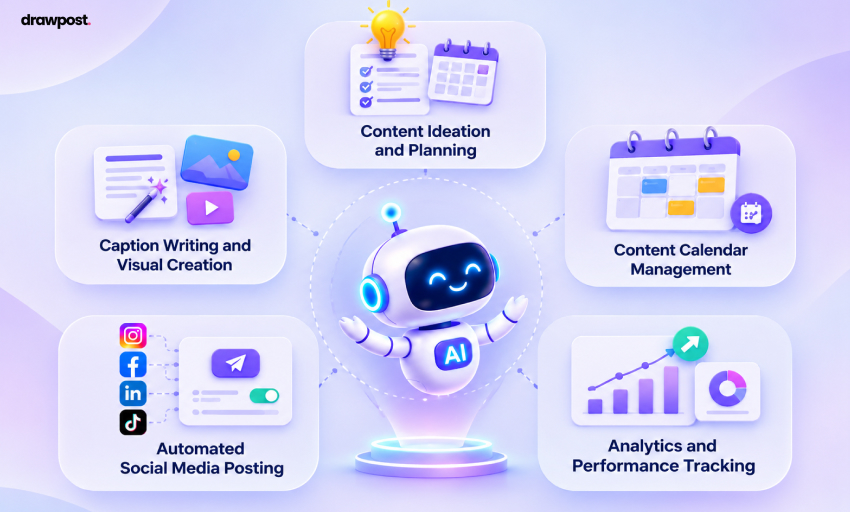
Today’s AI social media automation platforms do considerably more than just scheduling posts.
1. Content ideation and planning: AI can generate topic suggestions from your products, services, audience interests, and upcoming campaigns. Instead of starting with a blank page, you begin with ideas that can be refined.
2. Caption writing and visual creation: AI content creation tools can produce caption drafts, social graphics, and content variations. This reduces the manual effort involved in preparing every post.
3. Content calendar management: A centralized calendar helps organize campaigns, promotional dates, and recurring content themes before publication.
4. Automated social media posting: Once content is prepared and approved, scheduling tools can publish it across supported channels without requiring someone to log in at the scheduled time.
5. Analytics and performance tracking: Reporting tools can organize engagement, reach, and other performance data, making it easier to identify which topics deserve more attention.
Together, these capabilities turn several disconnected activities into a manageable production process.
What Still Needs a Human Touch
Automation works best when business owners retain control over decisions that require judgment. Your software doesn’t automatically know whether a promotion is profitable, whether a customer complaint requires special attention, or whether a particular message fits your company’s values. Those decisions still matter.
Here’s how responsibilities can be divided:
| Marketing responsibility | Traditional approach | Automation-supported approach |
| Content ideas | Content strategist | AI-generated suggestions |
| Social captions | Copywriter | AI drafts with human review |
| Graphics | Designer | AI-assisted visual creation |
| Posting schedule | Social media coordinator | Automated scheduling |
| Performance reporting | Marketing analyst | Centralized analytics |
| Brand direction | Marketing strategist | Business owner |
| Customer relationships | Community manager | Human-led engagement |
The advantage isn’t that automation makes marketing expertise irrelevant. It’s that a business owner can direct more marketing activity without personally executing every task. That creates a more practical operating model: human direction supported by automated execution.
How to Automate Social Media for a Small Business Without Hiring
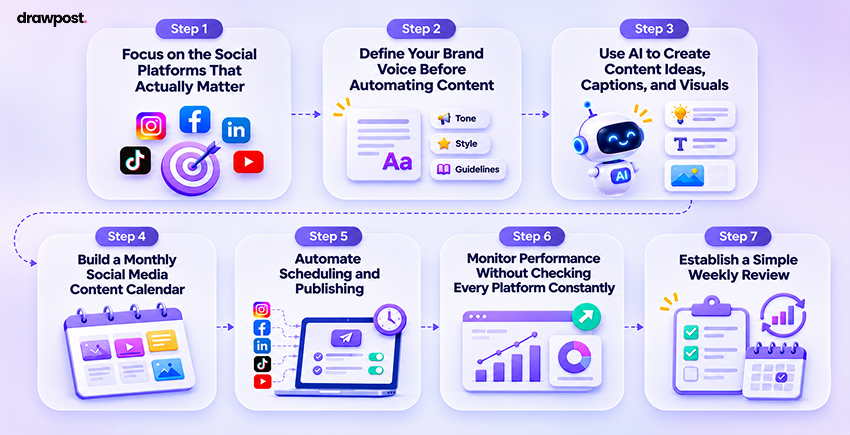
Automating social media doesn’t require a complicated technology setup. The goal is to establish a straightforward workflow that moves from business priorities to published content with minimal repetitive effort.
Here are seven steps to get started.
Step 1: Focus on the Social Platforms That Actually Matter
Before choosing any software, identify where your potential customers spend their time.
A local restaurant might prioritize Instagram and Facebook for menu updates, events, and community engagement. A B2B consulting company could find LinkedIn more relevant for building credibility and attracting business inquiries. Trying to maintain five active channels immediately creates more work than most small businesses need.
Start with one or two platforms that align with your customers and business goals. Then determine what you want social media to accomplish. For example, your priorities might include increasing local awareness, generating appointments, promoting products, or bringing visitors to your website. These goals should determine your content strategy, not the other way around.
Step 2: Define Your Brand Voice Before Automating Content
Generic content is one of the biggest risks of AI social media automation. If your tool knows nothing about your business, it may produce captions that sound similar to those of hundreds of unrelated brands. Give it enough context to work with.
Describe your products, services, target customers, brand personality, and unique selling points. Include visual preferences such as brand colors, photography styles, and approved design references.
A neighborhood bakery, for example, might prefer friendly, conversational captions centered on fresh products and local customers. An accounting firm might need a more precise, professional tone.
Tools with brand intelligence features can help preserve these preferences across content generation. DrawPost, for instance, allows users to enter their website URL to help establish a brand profile. Users can then review the audience, messaging, brand voice, and visual direction before generating content.
This initial setup helps make automated content more relevant to the business rather than simply producing more posts.
Step 3: Use AI to Create Content Ideas, Captions, and Visuals
Once your brand direction is established, content production becomes easier to organize. Instead of thinking of an entirely new idea every day, build content around a few recurring themes.
An online clothing store could rotate between new arrivals, styling advice, customer favorites, product education, and seasonal promotions. AI can develop these themes into caption drafts, image concepts, and variations for different channels.
For example, one product launch might become an Instagram carousel, a Facebook announcement, and a short LinkedIn post discussing the business behind the launch. The underlying information stays consistent, while the presentation changes for each audience.
This is where integrated AI platforms offer an advantage over basic writing tools. Some combine caption generation, visual creation, and content preparation, reducing the need to move between separate applications. However, speed shouldn’t come at the expense of accuracy. Review AI-generated claims, prices, product details, and visuals before publication.
Step 4: Build a Monthly Social Media Content Calendar
A social media content calendar turns individual ideas into an organized publishing plan. Rather than deciding what to post every morning, you can map content against business priorities for the next several weeks. Start with your upcoming promotions, product releases, holidays, events, and customer education topics. Then distribute posts across your chosen platforms.
Here’s an example for a local fitness studio:
| Week | Content theme | Example post |
| Week 1 | Awareness | Introduce classes and trainers |
| Week 2 | Education | Share beginner workout tips |
| Week 3 | Engagement | Feature an approved member story |
| Week 4 | Conversion | Promote a membership offer |
The schedule should reflect the business’s capacity and customer interests. Posting every day isn’t automatically better than publishing fewer, more useful posts. Modern social media management tools can help populate calendars with planned content, generate drafts, and organize publication dates. The result is a clearer view of what’s coming next, without having to manage each post individually.
Step 5: Automate Scheduling and Publishing
Creating content in advance solves only half the problem. Someone still needs to publish it. This is where social media scheduling for small businesses becomes particularly valuable.
Once your content is reviewed, you can schedule it for the appropriate dates and times. Supported tools then handle publication through connected social accounts. This makes it possible to prepare several weeks of content during one planning session.
For example, DrawPost combines AI content generation with a visual calendar and automated publishing across supported channels, including Instagram, Facebook, LinkedIn, X, and YouTube. Its Autopilot functionality can generate and schedule content around established brand preferences and posting cadence, reducing ongoing manual coordination.
Automation still needs oversight. Keep account permissions secure, review content before publishing, and pause scheduled posts when business circumstances change. The objective is to remove repetitive scheduling work, not lose control of your brand.
Step 6: Monitor Performance Without Checking Every Platform Constantly
Publishing regularly is useful only when your content supports meaningful business outcomes. Rather than checking likes and follower counts throughout the day, establish a routine for reviewing performance.
Look at which topics generate engagement, which posts bring visitors to your website, and which campaigns lead to inquiries or purchases. A local service provider, for instance, might care more about appointment requests than follower growth. An online retailer may prioritize product-page visits and completed orders.
Reporting tools can bring relevant data into one place, making regular reviews more efficient. Use these insights to improve future content. If practical tips consistently attract more qualified visitors than generic promotional posts, adjust your calendar accordingly.
Step 7: Establish a Simple Weekly Review
Automation shouldn’t create another system that demands constant attention. A brief weekly review is often a more practical starting point than daily content management.
Check upcoming posts for accuracy, confirm promotional details, review recent performance, and respond to customer interactions requiring personal attention. You can also use the review to provide the automation tool with new business information, such as a product launch, seasonal offer, or upcoming event. This creates a sustainable rhythm: plan periodically, let software manage approved execution, and review results regularly.
As the system becomes more reliable, you can expand content production without increasing manual work at the same rate.
Choosing the Right Social Media Automation Tools for Your Business
The best social media automation tools for small businesses aren’t necessarily the ones with the longest feature lists. They’re the ones that remove the most work from your existing process.
A tool that saves 15 minutes scheduling posts but still requires hours of manual writing and design may solve only a small part of the problem. Before subscribing, identify which tasks consume the most time and how much manual coordination remains between them.
Standalone Scheduling Tools vs. All-in-One AI Platforms
Traditional social media scheduling tools are useful when you already have finished content. Platforms such as Buffer, Later, Hootsuite, and Metricool offer different combinations of planning, publishing, and analytics capabilities. However, scheduling alone doesn’t address every content production challenge.
A business owner may still need to write captions, create graphics, research ideas, and organize campaigns before anything can be scheduled. All-in-one AI-powered platforms aim to connect more of this workflow.
| Capability | Basic scheduling tool | Integrated AI automation platform |
| Schedule existing posts | Typically available | Available |
| Generate content ideas | Varies | Commonly included |
| AI-assisted caption writing | Varies | Commonly included |
| Create social visuals | Varies | Often included |
| Organize a content calendar | Often included | Included in many platforms |
| Brand-specific generation | Varies | Often supported |
| Performance analytics | Varies | Often supported |
These categories aren’t absolute. Many established scheduling platforms also offer AI features, and capabilities vary by subscription.
The important distinction is how much work you can complete without changing tools.
Where DrawPost Fits Into a Small Business Workflow
For owners who want to reduce both content production and publishing work, DrawPost brings those activities into a connected platform. Its workflow begins with brand setup and extends through content generation, calendar planning, scheduling, and performance insights.
Businesses can create AI-assisted captions and visuals, organize campaigns, and schedule approved posts across connected channels. Its Autopilot feature also supports ongoing content generation and scheduling based on brand preferences. That combination addresses a common small business problem: having several tools available but no simple process connecting them.
Instead of treating content creation, scheduling, and reporting as separate projects, owners can manage them through a more centralized workflow. When evaluating any platform, test the output quality, brand consistency, publishing support, and time required for reviews. A free plan or trial can help determine whether the tool suits your business before committing to a paid subscription.
The Real Cost: Hiring a Marketing Team vs. Social Media Automation
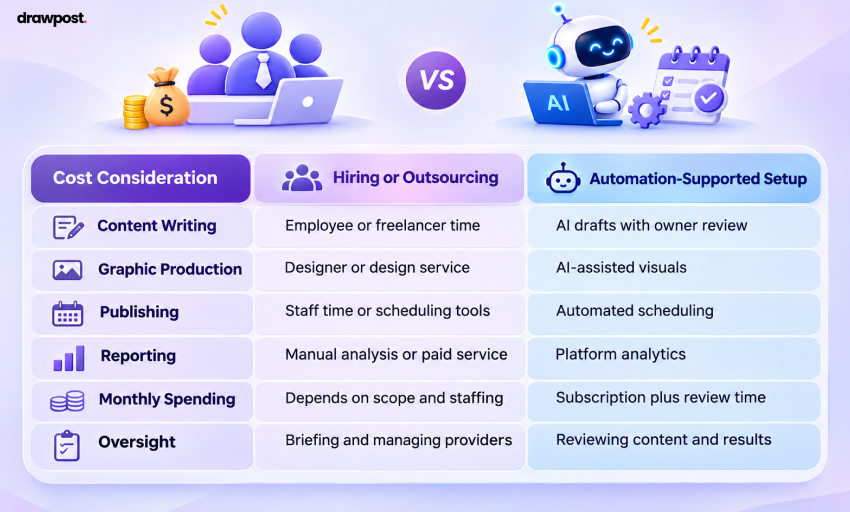
The financial case for automation goes beyond subscription prices. A traditional marketing setup involves people, production time, revisions, management, and supporting software. An automated setup shifts some of that work into a recurring software expense. That doesn’t make every responsibility disappear. It changes how work gets completed.
Consider two approaches for a small business maintaining a few active social media accounts.
| Cost consideration | Hiring or outsourcing | Automation-supported setup |
| Content writing | Employee or freelancer time | AI drafts with owner review |
| Graphic production | Designer or design service | AI-assisted visuals |
| Publishing | Staff time or scheduling tools | Automated scheduling |
| Reporting | Manual analysis or paid service | Platform analytics |
| Monthly spending | Depends on scope and staffing | Subscription plus review time |
| Oversight | Briefing and managing providers | Reviewing content and results |
The comparison becomes more concrete when you consider actual software costs.
DrawPost offers a free plan with 50 monthly AI credits. Its Creator plan is listed at $25 per month, while its Starter plan, designed for solo creators and small businesses, is listed at $49 per month with 400 monthly AI credits. The appropriate plan depends on content volume, required features, and account-management needs. Prices and limits should always be checked before subscribing. There’s also a less visible cost worth considering: the owner’s time.
Suppose you’re spending eight hours each week preparing and publishing social content. At an illustrative value of $40 per hour, that represents $320 in weekly time. If automation reduces your involvement to two hours, six hours become available for customers, operations, or revenue-generating work. That’s $240 in potential weekly time value, not guaranteed financial savings.
The strongest business case comes from combining lower production effort with an effective, sustainable marketing process.
How to Keep Your Social Media Running Without Burning Out
Automation solves a significant workload problem, but it works best alongside a manageable routine. You don’t need to spend every day evaluating new trends or creating content. You need a process that reflects your business priorities and available time.
Batch Content Instead of Creating Something Every Day
Set aside a recurring planning session to identify upcoming campaigns, promotions, and relevant content topics. Use AI to develop drafts, review them together, and prepare posts in advance.
Batching reduces repeated context switching and helps keep messaging consistent across channels. It also makes last-minute content emergencies less common.
Automate Execution Without Automating Every Conversation
Not everything should run on autopilot.
Customers asking for quotes, reporting problems, or seeking personalized advice deserve appropriate human attention. Likewise, major announcements and sensitive topics need careful review.
Social media should feel approachable, even when much of the underlying production process is automated. Use automation to maintain consistency. Keep humans responsible for trust.
Measure Outcomes Instead of Counting Posts
A calendar full of content can look productive without generating business value.
The more useful questions are whether social media is reaching the right customers, attracting meaningful engagement, and contributing to business results.
Track a small set of metrics aligned with your goals. For many businesses, those might include qualified inquiries, bookings, website visits, or sales influenced by social content. Review what works and adjust accordingly. A sustainable system does not publish the most. It delivers useful results without consuming disproportionate time and money.
Build Your Social Media Presence Without Building a Marketing Department
Small businesses no longer have to choose between managing every social media task manually and hiring an expensive team. AI-powered automation creates a practical third option. By connecting content planning, caption writing, visual creation, scheduling, and reporting, business owners can maintain a more consistent online presence with fewer operational demands.
The key is to automate repetitive execution while keeping brand strategy, quality control, and customer relationships in human hands.
Start with the platforms that matter, build a realistic content calendar, and choose software that reduces work across the entire process. If you want to bring content creation and publishing into one workflow, DrawPost offers an accessible place to begin.
Your business deserves a strong social presence. It shouldn’t require a full marketing department to maintain one.
Frequently Asked Questions
Q. How can small businesses automate social media?
Small businesses can automate social media marketing by using AI tools to generate content ideas, create captions and visuals, schedule posts, and track performance. An integrated platform reduces repetitive tasks and helps maintain a consistent online presence without managing multiple applications.
Q. How do I automate social media for my small business?
Start by identifying your target audience and choosing the platforms you want to prioritize. Define your brand voice, generate content with AI, and organize posts in a content calendar. Use a scheduling tool to publish approved posts automatically and review performance weekly.
Q. Can social media be automated without a marketing team?
Yes. Modern social media management tools can handle much of the content creation, planning, and publishing workload. If you’re wondering how to manage social media without a marketing team, start by automating repetitive activities while retaining human control over brand strategy and customer engagement.
Q. What is the best way to automate social media for a small business?
The most practical approach is to use an all-in-one platform that combines AI content creation, scheduling, and analytics. Tools like DrawPost simplify small business social media automation by bringing these activities into one workflow, reducing manual work and the need for multiple subscriptions.
Q. What social media tasks can small businesses automate?
Businesses can automate content ideation, caption drafting, visual creation, scheduling, publishing, and performance reporting. AI tools can also help repurpose existing content into automated social media posts. Customer complaints, sensitive communications, and important brand decisions should still receive human attention.
Q. How much does social media automation cost for a small business?
Costs vary depending on the platform, number of accounts, and features required. Some tools offer free plans, while paid subscriptions provide additional automation capabilities. DrawPost offers a free option and paid plans starting at $25 per month, making it an accessible alternative to hiring dedicated marketing staff.
Q. Can AI create and publish social media posts automatically?
Yes. AI-powered platforms can generate captions and visuals, organize content calendars, and schedule posts across supported channels. For businesses exploring how to automate social media posts for small business accounts, these tools reduce manual publishing while allowing owners to review content before it goes live.
Q. Will AI-generated social media content sound like my brand?
AI-generated content can reflect your brand when the platform uses your business information, tone, audience preferences, and visual guidelines. Brand-aware tools like DrawPost help maintain consistency, although reviewing early outputs and refining preferences remains important.
Our Latest Insights

Social Media Scheduling: 9 Best Practices for Brands and Agencies
Discover 9 social media scheduling best practices for brands and agencies, from content calendars and approvals to cross-platform publishing and automation.

How to Manage Multiple Social Media Accounts: A Practical Guide for Businesses
Learn how to manage multiple social media accounts with smarter content planning, scheduling, automation, and analytics to save time and stay organized.

How to Generate 30 Days of Social Media Content in 30 Minutes With AI
Learn how to plan 30 days of social media content in 30 minutes with AI. Discover time-saving strategies, content calendars, and tools like DrawPost.