Table of Contents
Black Friday brings an unusual challenge for marketers. Customers are actively looking for deals, but nearly every brand is competing for their attention at the same time.
A clothing retailer announces 40% off. A beauty brand launches a limited-edition bundle. A software company promotes its annual subscription. Within minutes, social feeds fill with similar offers, countdowns, and promotional graphics. The challenge is getting customers to notice your offer, understand its value, and take action before the promotion ends. That takes more than a discount announcement.
A well-planned Black Friday social media strategy builds interest before the sale, helps customers evaluate products, and makes purchasing decisions easier when the offers go live. With Black Friday 2026 falling on Friday, November 27, businesses have a clear date around which to organize their campaigns.
This guide covers practical Black Friday social media ideas, a ready-to-use content calendar, platform-specific recommendations, and ways to simplify campaign planning and publishing with AI.
How to Create a Black Friday Social Media Strategy in 2026
A successful campaign begins well before the first promotional post appears. Businesses need to decide which customers they want to reach, what those customers should buy, and how social media will move them closer to that decision. The following steps provide a practical foundation for a Black Friday marketing strategy in 2026.
1. Start With Your Customers and Their Buying Decisions
Before choosing your promotional graphics or writing captions, consider what customers need to know before purchasing.
An established fashion brand might have customers waiting for discounts on products they already want. A newer skincare company may need to explain product benefits, ingredients, and suitability before presenting an offer. Those situations call for different campaigns.
Review previous customer questions, top-selling products, website activity, and social media engagement. Look for the information customers repeatedly request and the objections that prevent them from buying. For example, if customers frequently ask whether a skincare product suits sensitive skin, create an educational post before introducing its Black Friday discount. That content gives customers useful information when they are still evaluating their options.
2. Set One Primary Campaign Goal
More followers, higher engagement, and increased sales may all be desirable outcomes. However, a campaign needs a primary objective that guides its content and measurement.
A retailer clearing seasonal inventory might prioritize purchases of selected products. A SaaS company could focus on annual subscriptions, while a local salon may want customers to purchase prepaid appointment packages. Once the objective is clear, establish the customer action you want each post to encourage.
A product demonstration could direct viewers to a product page. An early-access announcement might encourage registrations. A Black Friday launch post should make purchasing as straightforward as possible. Avoid treating every post as a separate campaign. Each one should contribute to the same commercial objective.
3. Choose Offers That Provide Clear Value
An attractive percentage does not automatically make an attractive offer. Customers also consider the actual price, product usefulness, shipping charges, and whether the promotion applies to something they want.
Some practical Black Friday promotional campaigns include:
- Product bundles: Combine complementary products at a clear package price.
- Tiered discounts: Offer different incentives based on qualifying purchase amounts.
- Early access: Give loyal customers access before the public launch.
- Free shipping: Reduce a common source of purchase hesitation.
- Limited-time offers: Promote genuinely time-bound prices or packages.
- Value-added packages: Include useful services or accessories.
For example, a fitness equipment brand might offer a home workout bundle rather than discounting every item individually. Whatever you choose, make the terms understandable. Customers should not need to read several paragraphs to work out what they will pay.
4. Build Your Content Around the Customer Journey
One of the most common mistakes is promoting the discount repeatedly without explaining why the product deserves attention. A more effective approach organizes content around three stages.
Before the sale: Introduce products, demonstrate their value, address common questions, and give interested customers a reason to return.
During the sale: Present the offer, explain its conditions, direct customers to the purchase page, and answer questions quickly.
Before the deadline: Highlight remaining opportunities, clarify when the promotion ends, and provide accurate availability information.
Consider a skincare brand preparing a Black Friday bundle. Early posts could explain the products and how they work together. Later content introduces the package price. On November 27, the brand publishes the offer and answers last-minute questions. Each post has a distinct purpose, which makes the overall campaign more useful.
5. Prepare Your Content and Operations Together
A strong social media campaign can lose momentum when the shopping experience fails to match the promotion. Before scheduling posts, confirm the inventory, promotional prices, coupon codes, landing pages, shipping conditions, and customer support arrangements. For businesses offering appointments or services, verify booking availability and redemption terms.
Prepare a consistent visual direction for the campaign. Product images, videos, captions, and promotional messages should feel connected without looking identical. This is also the right stage to decide who approves content and who handles customer questions during the sale. The goal is to have the important decisions settled before Black Friday begins.
Black Friday Social Media Ideas That Encourage Customers to Act
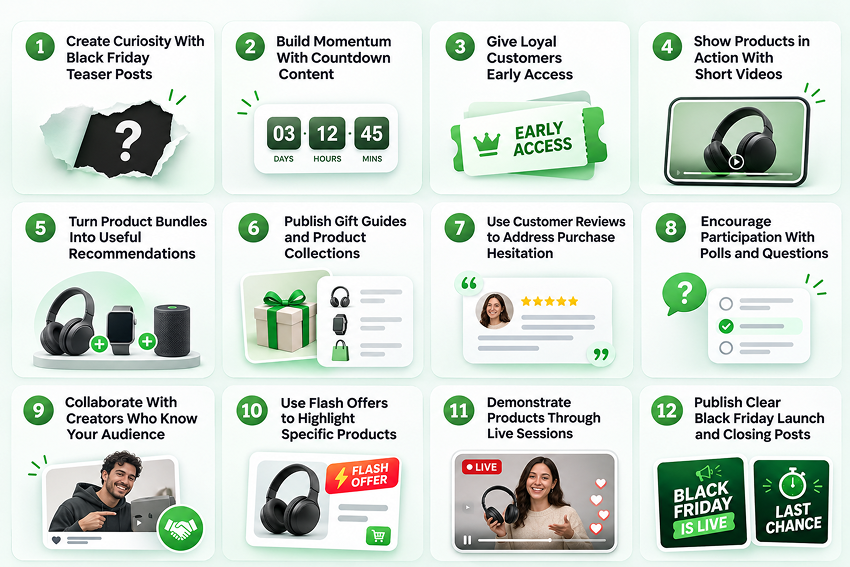
An effective content calendar needs variety. If every post communicates the same discount, customers have little reason to keep paying attention. The most useful Black Friday social media ideas combine product discovery, practical information, engagement, and clear purchase opportunities.
Here are 12 approaches businesses can adapt to their campaigns.
1. Create Curiosity With Black Friday Teaser Posts
Teaser posts give customers an early indication of what’s coming without revealing every promotional detail.
A fashion brand might preview three products that will feature in its upcoming sale. A home decor store could show close-up images of selected items and invite followers to guess which collections will be discounted. The objective is to make the upcoming announcement worth following.
A teaser works particularly well when it introduces something customers already care about, such as a popular product returning to stock or a limited collection becoming available.
2. Build Momentum With Countdown Content
Countdowns provide a simple way to connect early promotional activity with the main sale.
Use Instagram Stories, short videos, or branded graphics to communicate how many days remain before an offer begins. Instead of repeatedly publishing a number, give each countdown post a useful message.
Five days before Black Friday, introduce a featured product. Three days before, explain the offer. One day before, confirm the launch time and purchasing details. The countdown then becomes part of the campaign narrative rather than another repetitive design.
3. Give Loyal Customers Early Access
Existing customers already understand your brand, which makes them a valuable audience for advance promotions.
A business could offer registered customers a private shopping link, provide early access to selected products, or allow loyalty members to purchase a bundle before the public launch. Promote the opportunity on social media with clear eligibility and registration details.
For example, a beauty brand might announce:
“Your Black Friday favorites are almost here. Join our early-access list to shop selected bundles before the public sale opens.”
The message gives customers a specific reason to take action before Black Friday.
4. Show Products in Action With Short Videos
Product demonstrations can answer questions that promotional graphics cannot.
A clothing brand can show how an outfit fits and moves. A kitchenware company can demonstrate a product in use. A software company can walk through a feature that customers frequently ask about. The strongest videos address one buying question at a time.
Instead of explaining every product feature, demonstrate a benefit that matters to the intended customer. Short-form content also provides material that businesses can adapt for multiple social channels.
5. Turn Product Bundles Into Useful Recommendations
Bundles work best when the products make sense together.
A coffee brand might create a home brewing package with beans, a grinder, and accessories. A wellness business could offer a collection built around a particular routine. The social content should explain why the items belong together and who would benefit from the package.
A carousel can introduce the bundle, show its individual components, explain the combined value, and direct customers to the offer. This approach makes the buying decision easier while giving the promotion a story beyond its price.
6. Publish Gift Guides and Product Collections
Black Friday shoppers may know they want to purchase something without knowing which product to choose. Well-organized recommendations help narrow that decision. Businesses can create product collections based on interests, budgets, customer needs, or buying occasions.
For example:
- Gifts under $50
- Home office essentials
- Skincare sets for beginners
- Fitness products for small spaces
- Everyday accessories under $25
Use carousels, short videos, or collection graphics to make these recommendations easy to browse. The emphasis should remain on helping customers find suitable products rather than filling the feed with unrelated items.
7. Use Customer Reviews to Address Purchase Hesitation
Before buying from an unfamiliar brand, customers often want evidence that the product delivers what it promises. Customer testimonials, user-generated content, and authentic reviews can provide that reassurance.
A furniture business could share customer photographs showing a product in a real home. A SaaS company might feature a customer explaining how a particular feature improved their workflow. Choose reviews that address genuine questions about quality, usability, or customer experience. Always obtain the necessary permission before republishing customer content.
8. Encourage Participation With Polls and Questions
Black Friday content can also create a conversation. An apparel brand might ask followers which jacket color should appear in a featured promotion. A beauty retailer could invite customers to vote between two product bundles.
Interactive posts provide a reason to engage before the sale while giving businesses additional insight into audience preferences. However, participation should be meaningful. If a poll suggests that followers are choosing the next discount, the business should be prepared to honor that promise.
9. Collaborate With Creators Who Know Your Audience
Creator partnerships can introduce products through people whose content audiences already follow. Rather than asking creators to repeat promotional copy, give them room to demonstrate how the product fits into their normal content.
A fitness creator could show a workout using equipment featured in a Black Friday offer. A skincare creator might explain how a product fits into a routine. Agree on the deliverables, publishing dates, approval requirements, and promotional disclosures before the campaign.
Authentic demonstrations generally offer more information than a generic announcement that a sale is approaching.
10. Use Flash Offers to Highlight Specific Products
A time-limited offer can create a focused reason to visit a store or website. For example, a retailer might promote a verified two-hour discount on selected products, with the exact start time and conditions clearly displayed.
Make sure the offer is operationally manageable. Inventory, customer support, and checkout systems need to accommodate the expected activity. Avoid extending a supposedly final offer repeatedly or suggesting that stock is almost gone without reliable information. Customer trust is worth more than an extra urgency graphic.
11. Demonstrate Products Through Live Sessions
Live content allows businesses to answer questions while customers evaluate an offer.
A beauty retailer might demonstrate a Black Friday skincare collection. A technology brand could compare product specifications, show compatibility, and answer common purchasing questions.
Promote the session in advance and prepare the products, presenters, and purchase links. The value comes from helping viewers make informed decisions, rather than simply announcing discounts in real time.
12. Publish Clear Black Friday Launch and Closing Posts
When the sale begins, customers should immediately understand what is available. The main announcement needs the offer, eligible products, promotional period, and purchase destination.
As the deadline approaches, publish reminders that answer practical questions. Is the offer still active? Which products remain available? When does the price return to normal? These details are particularly important when customers discover a promotion late in the day. The final reminder should communicate the actual deadline and provide a direct purchasing link.
Adapt Your Black Friday Content to Each Social Platform
The same campaign can work across several channels, but the presentation should reflect how customers use each one.
| Platform | Effective Black Friday content | Primary purpose |
| Product Reels, carousels, Stories, countdowns | Discovery and product consideration | |
| Offer posts, demonstration videos, community updates | Information and website traffic | |
| TikTok | Creator demonstrations, short product comparisons | Discovery and engagement |
| Product collections, gift guides, shopping graphics | Browsing and purchase planning | |
| Software offers, professional service packages, product demos | B2B lead generation | |
| X | Launch updates, offer reminders, customer information | Timely communication |
| YouTube | Shorts, product explanations, demonstrations | Product education |
For instance, a home fitness brand could create one core campaign about a discounted workout package.
On Instagram, it might publish a Reel demonstrating the equipment. On Facebook, the same campaign could explain the package contents and offer conditions. On YouTube Shorts, the brand could feature a brief workout using the products.
The underlying message stays consistent, while the format and information change to match the audience. This is more effective than copying the same caption into every channel and assuming the results will be identical.
Black Friday 2026 Content Calendar: What to Post and When
Planning the content is one challenge. Knowing when to publish it is another. Many businesses concentrate their promotional activity on Black Friday itself, leaving little time for customers to discover products or evaluate the offer.
A Black Friday content calendar helps distribute those messages across the weeks leading up to November 27. The objective isn’t to publish every day. It’s to give each stage of the campaign a purpose.
A Practical Black Friday Social Media Content Calendar
The following schedule provides an example for a business running its main promotion on November 27, 2026.
| Date | Content idea | Suggested format | Customer action |
| Nov 2 | Announce that Black Friday offers are coming | Teaser graphic | Follow for updates |
| Nov 5 | Ask customers which products interest them | Story poll | Share preferences |
| Nov 9 | Introduce a featured product | Reel or short video | Explore the product |
| Nov 12 | Share customer reviews | Carousel | Learn about the product |
| Nov 16 | Preview a promotional bundle | Product carousel | Save the offer |
| Nov 19 | Announce early-access registration | Feed post and Story | Join the list |
| Nov 23 | Reveal the main offer and conditions | Promotional graphic | Plan purchases |
| Nov 25 | Answer common buying questions | Carousel or video | Review offer details |
| Nov 26 | Confirm launch time and provide a reminder | Countdown Story | Return on launch day |
| Nov 27, morning | Announce that Black Friday offers are live | Reel and feed post | Shop the sale |
| Nov 27, afternoon | Highlight featured products and availability | Stories and short videos | Explore available deals |
| Nov 27, evening | Communicate the confirmed closing deadline | Final reminder | Complete purchase |
This calendar is a starting point rather than a fixed schedule. A small business might publish three times a week and increase activity on Black Friday. A larger ecommerce brand may have enough products and creative resources to publish more frequently.
What matters is the progression of information. Customers should learn about the products before they receive the main offer. They should understand the promotional terms before the sale begins. And when the promotion goes live, they should know exactly where to purchase.
How to Prepare Your Calendar Without Last-Minute Work
Start by listing the content required for each stage of the campaign. Group posts according to their purpose, then decide which formats are most suitable. Next, prepare captions, visuals, publishing dates, destination links, and approval responsibilities.
Social media content scheduling becomes easier when these decisions are made together rather than one post at a time.
For agencies managing several clients, this becomes particularly important. A fashion retailer’s campaign may begin with outfit inspiration, while a software client’s campaign may depend on product demonstrations and subscription comparisons. Both may be promoting Black Friday, but their calendars should reflect different customer decisions.
This is where an AI social media manager such as DrawPost can help teams organize content, prepare creative assets, and schedule posts across connected social accounts. Instead of handling every post independently, marketers can build a coordinated publishing workflow.
How to Measure Your Black Friday Social Media Results
A successful Black Friday campaign should be evaluated against the goal established before the promotion began. High engagement may indicate that content attracted attention. But if the objective was to generate sales, engagement alone doesn’t establish success.
Review the following measures:
| Metric | What it tells you |
| Reach and impressions | How widely the campaign was seen |
| Engagement rate | How audiences interacted with content |
| Link clicks | How many people moved toward the offer |
| Conversion rate | How effectively visits became purchases |
| Campaign revenue | The sales attributed to promotional activity |
| Customer acquisition cost | The cost of gaining customers through paid campaigns |
Use campaign-tagged links and relevant website analytics to help connect social activity with purchases.
Also examine the content itself. Did demonstrations receive more qualified interest than discount graphics? Did customers ask questions that should have been answered earlier? Were some promotions difficult to understand? These observations can improve future campaigns.
Avoid concluding a single highly viewed post. Look at how the content worked together to move customers from discovery to purchase.
These insights become more valuable when businesses can apply them to future campaigns. However, managing content creation, publishing schedules, and performance reviews across multiple social platforms can demand considerable time and coordination. AI-powered automation can help bring these activities into a more manageable workflow.
Create and Automate Black Friday Campaigns With DrawPost AI
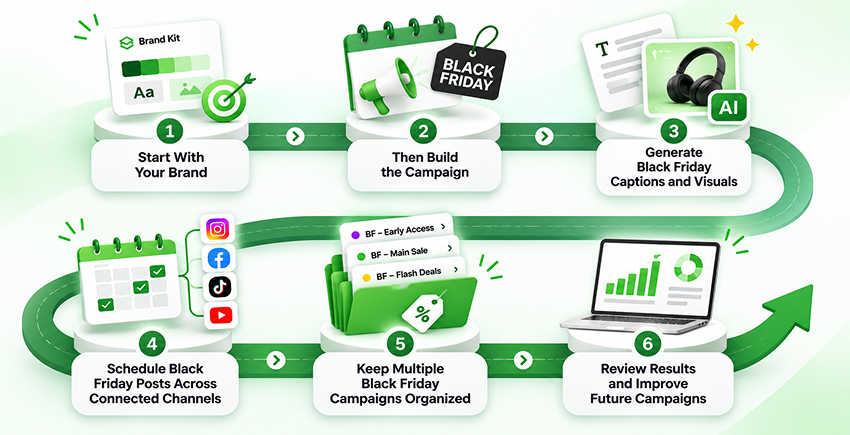
Turning a Black Friday strategy into a coordinated campaign involves several moving parts. Promotional graphics, product explanations, platform-specific captions, and countdown reminders all need to align with the campaign schedule.
DrawPost brings these activities into one AI-powered social media management platform. Businesses can use it to develop brand-aligned content, organize campaigns, automate publishing, and review performance without managing each activity separately.
Start With Your Brand, Then Build the Campaign
DrawPost allows businesses to begin by entering their website URL. Our platform uses that information to establish an initial brand profile, which users can review and refine. That profile includes information about the brand’s positioning, target audience, communication preferences, and visual direction.
For example, a skincare business preparing a Black Friday campaign can establish a consistent brand voice before creating promotional content. The marketing team still decides which products to feature, what discounts to offer, and how the campaign should be presented. DrawPost then helps turn that direction into social media content.
Generate Black Friday Captions and Visuals
Preparing multiple creative assets is often one of the most time-consuming parts of campaign execution.
DrawPost’s Create & Campaign capabilities support promotional content generation, including captions and visuals. It supports various content formats, including still images, carousels, videos, and stories.
Consider a retailer preparing a Black Friday product bundle campaign. The marketing team might need an early teaser, an educational carousel, a product announcement, and a final reminder.
Instead of creating every asset from the beginning, the team can use DrawPost to develop content based on its brand profile and campaign direction. An AI social media post generator can provide a useful starting point, but generated content should still be checked against approved prices, product information, and offer conditions.
For businesses exploring an AI social media post generator for free, the key consideration is whether the tool supports their wider workflow, including brand consistency, creative production, and scheduling.
Schedule Black Friday Posts Across Connected Channels
Once the content is ready, publishing becomes the next operational challenge. DrawPost provides a visual content calendar, publishing preferences, and cross-platform scheduling for supported connected accounts. It supports Instagram, Facebook, LinkedIn, X, and YouTube, and other publishing integrations.
A business can use the calendar to organize teaser posts, promotional announcements, and reminders in advance, instead of switching between several social media dashboards throughout the campaign.
DrawPost’s Autopilot can also generate and schedule content around a brand profile, established content plan, and preferred publishing frequency.
For time-sensitive Black Friday offers, marketers should review the content and verify the schedule before allowing it to publish. The platform provides automation, while the business remains responsible for ensuring every promotional message is accurate.
Keep Multiple Black Friday Campaigns Organized
Agencies face varying levels of complexity. One client may be launching a clothing sale, another may be promoting beauty products, and a third may be introducing a discounted software subscription.
Each campaign requires separate messaging, visuals, and publishing schedules. DrawPost supports dedicated brand profiles and multi-brand workspaces, allowing agencies to keep client content organized within a centralized environment.
For teams comparing AI social media management tools for agencies, this separation matters. It helps preserve each client’s brand identity while reducing repetitive content coordination.
Review Results and Improve Future Campaigns
DrawPost also provides channel performance insights, competitor content tracking, and trend analysis. These capabilities can help marketers examine which social posts attracted attention and how audiences engaged with campaign content.
For purchase-level results, businesses should combine social performance information with appropriate ecommerce or website analytics. That distinction is important. A well-performing Instagram Reel may increase product interest, but the business still needs to understand whether viewers visited the website and purchased.
The broader value of DrawPost is the connection between planning, content production, publishing, and review.
Want to prepare your Black Friday content calendar without managing every post manually?
Explore DrawPost’s campaign planning and scheduling features.
Final Thoughts
Black Friday social media marketing works best when businesses give customers useful reasons to pay attention before asking them to purchase.
A relevant offer is the starting point. Product demonstrations, customer reviews, clear promotional information, and timely reminders help turn that offer into a coordinated campaign.
The operational challenge is keeping everything organized across different channels while managing the daily responsibilities of the business.
With DrawPost, brands and agencies can bring content planning, creative generation, scheduling, and publishing into one workflow, leaving more time for campaign decisions and customer engagement.
A well-executed Black Friday campaign doesn’t depend on publishing the most posts. It depends on communicating the right information when customers need it.
Frequently Asked Questions
Q. How to Create a Black Friday Social Media Strategy in 2026?
Start by identifying your target customers, campaign goals, and products or services to promote. Choose offers that provide clear value, then plan content for the weeks leading up to November 27, 2026. Prepare promotional visuals, product information, landing pages, and publishing schedules in advance. Monitor engagement, website traffic, and sales throughout the campaign to understand which activities are producing results.
Q. What Should Businesses Post on Social Media for Black Friday?
Businesses should combine promotional posts with content that helps customers make buying decisions. Useful Black Friday social media post ideas include product demonstrations, gift guides, customer testimonials, countdowns, early-access announcements, product bundles, and last-chance reminders. Rather than repeating the same discount, each post should answer a customer question, demonstrate value, or communicate a specific purchasing opportunity.
Q. When Should Businesses Start Posting for Black Friday 2026?
Businesses can begin building awareness in early November, approximately three to four weeks before Black Friday on November 27, 2026. The ideal starting point depends on the audience, product complexity, and promotional budget. Brands with longer purchase cycles may benefit from additional preparation, while smaller businesses can run a focused campaign over the final two weeks.
Q. What Are the Best Black Friday Social Media Campaign Ideas?
The best Black Friday social media campaign ideas depend on what your customers value and how they make purchasing decisions. Early-access offers, product bundles, short-form demonstrations, creator collaborations, and limited-time promotions can serve different campaign objectives. Businesses should select ideas that fit their products, resources, and audience rather than adopting every popular promotional format.
Q. How to Plan a Social Media Content Calendar for Black Friday?
Begin by dividing the campaign into awareness, product education, offer announcement, and final reminder stages. Assign content topics, formats, publishing dates, and calls to action to each stage. Prepare and approve the creative assets before the sale. Businesses can also use AI-powered tools such as DrawPost to help generate content, organize calendars, and schedule posts across supported social channels.
Our Latest Insights
9 Ways AI Can Improve Your Social Media Content Strategy
Discover 9 ways AI can improve your social media content strategy, from content planning and creation to scheduling, brand consistency, and analytics.
How to Maintain a Consistent Brand Voice Across Social Media?
Learn how to maintain a consistent brand voice across social media with practical guidelines, platform-specific strategies, team workflows, and AI tools.

Top 10 AI Social Media Management Tools for Agencies in 2027
Compare the 10 best AI social media management tools for agencies in 2027. Explore features, pricing, pros, cons, and solutions for managing multiple clients.