How to Manage Multiple Client Social Media Campaigns During the Holidays

Table of Contents
The holiday season is a major opportunity for brands to connect with customers. For marketing agencies, however, it often comes with a less festive reality: overlapping campaigns, compressed deadlines, endless content requests, and clients who all need their promotions published at the same time.
One client is preparing a Black Friday sale. Another needs a month of Christmas content. A third wants a last-minute New Year’s campaign, while your team is still waiting for approvals on posts scheduled for tomorrow.
Managing multiple social media campaigns during the holidays requires more than a packed content calendar. Agencies need a coordinated system for organizing client priorities, creating brand-specific content, managing approvals, and scheduling posts without overwhelming their teams.
This guide explains how to build that system, reduce repetitive work, and use AI-powered social media automation tools to keep holiday campaigns running smoothly across multiple client accounts.
Why Managing Multiple Client Holiday Campaigns Is Challenging
Holiday campaigns create an unusual operational challenge: every client has different marketing priorities, but many of their deadlines fall within the same few weeks.
A fashion retailer may need daily promotional posts during Black Friday week. A hospitality brand might prioritize Christmas bookings, while a B2B company focuses on year-end messaging and customer appreciation.
Each campaign requires its own creative direction, publishing schedule, approval process, and performance metrics. The main difficulties typically include:
- Overlapping deadlines: Several brands may need content published during the same promotional periods.
- Different brand identities: Each client requires distinct messaging, visuals, offers, and audience targeting.
- Higher content volumes: Holiday promotions often involve additional announcements, reminders, and platform-specific content.
- Delayed approvals: Client stakeholders may be unavailable during vacations or year-end business closures.
- Fragmented workflows: Content spread across spreadsheets, design tools, email threads, and publishing platforms becomes difficult to coordinate.
- Unexpected campaign changes: Inventory updates, revised offers, and changing business priorities can disrupt scheduled content.
These challenges become more significant as an agency’s client portfolio grows.
Consider an agency handling eight clients across Instagram, Facebook, and LinkedIn. Even if each client publishes only four posts weekly, the team must coordinate 32 posts every week, or approximately 128 over four weeks, before accounting for stories, videos, revisions, and promotional updates.
The solution is not simply asking people to work faster. It is establishing a repeatable process that keeps campaign strategy, production, approvals, and publishing connected.
How to Manage Multiple Client Social Media Campaigns During the Holidays
The most effective approach combines centralized oversight with separate execution workflows for each client. Agencies need visibility into every campaign without sacrificing the individual identity, objectives, or requirements of the brands they represent.
The following seven steps provide a practical framework for managing social media campaigns for multiple clients during the holiday season.
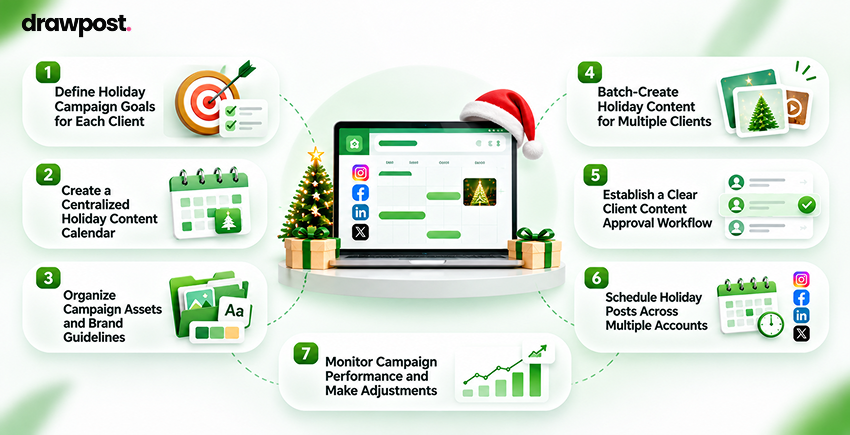
1. Define Holiday Campaign Goals for Each Client
Before planning posts, establish what each client wants to achieve.
Holiday campaigns often look similar on the surface, but their business objectives may be entirely different. An ecommerce company might prioritize holiday sales, while a consulting firm may focus on generating qualified leads before the end of the year. A restaurant could promote seasonal reservations, while a SaaS brand might use the holidays to strengthen customer relationships.
Start by documenting four essential elements for every client:
- Business objective: What outcome should the campaign deliver?
- Target audience: Who should the campaign reach?
- Promotional priorities: Which products, offers, or messages matter most?
- Success metrics: How will the client evaluate performance?
Translate these objectives into measurable campaign targets wherever possible. For instance, a retailer could focus on purchases attributed to social traffic, while a B2B company may measure consultation requests or qualified leads.
Next, identify which seasonal events are relevant to each client. Black Friday, Cyber Monday, Christmas, and New Year’s campaigns may all deserve attention, but not every brand needs to participate in every occasion.
The key principle is simple: plan around the client’s business priorities, not the holiday calendar alone.
This prevents agencies from investing time in content that looks seasonal but contributes little to the client’s objectives.
2. Create a Centralized Holiday Content Calendar
Once campaign goals are established, the next priority is organizing deadlines.
A holiday content calendar should show what needs to be published, when it goes live, who owns it, and whether it has received approval. For effective social media management for multiple clients, agencies should maintain two connected views.
A client-specific calendar contains campaign themes, planned posts, content formats, captions, platform selections, and publishing dates.
An agency-wide calendar provides a consolidated overview of deadlines, production workloads, campaign launches, and pending approvals.
Consider the following example.
| Client | Campaign | Channel | Planned publishing | Status |
| Fashion retailer | Black Friday early access | Nov. 23 | Approved | |
| Fitness brand | Holiday membership offer | Dec. 3 | In review | |
| SaaS company | Year-end customer appreciation | Dec. 18 | Draft | |
| Restaurant | Christmas reservation reminder | Dec. 10 | Scheduled |
Illustrative dates and statuses.
This structure makes competing priorities easier to identify. For instance, if three campaigns require creative approval on the same day, the agency can redistribute workloads or request feedback earlier. It is equally important to work backward from publishing deadlines.
A Christmas campaign scheduled for December 15 might require final approval by December 10, internal review by December 8, and completed creative assets by December 5.
Planning backward creates room for revisions instead of treating publication dates as the only deadlines that matter. A centralized calendar also helps teams manage multiple social media accounts without switching constantly between disconnected planning documents.
3. Organize Campaign Assets and Brand Guidelines
One of the easiest ways to create publishing errors is to manage different clients’ creative assets in the same unstructured workspace. During busy holiday periods, similar promotional messages, festive visuals, and campaign offers can become surprisingly easy to confuse. Agencies should maintain a dedicated brand environment for every client.
Each environment should contain:
- Approved logos, fonts, and brand colors.
- Brand voice and messaging guidelines.
- Holiday campaign briefs and promotional details.
- Product images, videos, and creative references.
- Platform-specific formatting requirements.
- Restricted claims, disclaimers, and approval contacts.
These resources should be accessible to everyone responsible for creating, reviewing, or publishing content.
A useful approach is to establish naming conventions for every campaign asset. For example, a file named ClientA_Christmas_Instagram_Offer01 is easier to identify than holiday-final-v3.
However, file organization solves only part of the problem. Teams also need a consistent way to preserve brand context during content creation.
For example, DrawPost allows agencies to establish dedicated brand profiles using information about each business, including its audience, positioning, brand voice, and visual identity. Its multi-brand management capabilities help keep different client environments and content directions separate within a centralized platform.
This becomes particularly useful when an agency is developing holiday campaigns for brands operating in completely different industries. The objective is to make brand consistency a built-in part of the workflow rather than something managers must repeatedly correct.
4. Batch-Create Holiday Content for Multiple Clients
Creating every post individually is inefficient when dozens of holiday campaigns are running simultaneously.
Content batching reduces unnecessary switching between tasks and gives creative teams more time to focus on campaign quality. Instead of drafting one post, requesting a design, reviewing it, and repeating the process for the next client, organize production into dedicated stages.
Start with campaign themes: Identify the messages each client needs across the holiday period. An ecommerce brand might require early-access announcements, product highlights, promotional reminders, and last-chance offers.
Develop related content together: Create several captions, visuals, and platform variations within a focused production session.
Adapt content for different channels: One campaign concept can support multiple platforms, but the final execution should reflect how audiences consume content on each channel.
For example, a Christmas promotion might become an Instagram carousel featuring selected products, a Facebook post emphasizing the offer, and a short video highlighting the customer experience. The campaign idea remains consistent while the presentation changes.
Use AI to accelerate the first draft: AI-powered tools can support holiday social media content planning by generating campaign ideas, captions, visual concepts, and content variations. However, agencies should still verify prices, promotional dates, product claims, and brand messaging.
For teams looking to generate social media content with AI, DrawPost provides AI-assisted captions and visuals informed by each brand’s profile. Its content generation workflow can help agencies prepare multiple posts in advance rather than starting every campaign asset from scratch.
The goal of batching is not to produce more generic content. It is to reduce repetitive production work while protecting time for strategy, creative judgment, and quality control.
5. Establish a Clear Client Content Approval Workflow
An excellent holiday campaign can still miss its launch date if approvals arrive too late. Agencies often face this problem when multiple stakeholders review creative assets through email, messaging apps, and shared documents. A structured client content approval workflow helps prevent confusion.
A practical sequence involves five stages:
- Draft: The content team prepares captions, visuals, and campaign details.
- Internal review: Account managers verify accuracy, quality, and brand alignment.
- Client review: The authorized stakeholder reviews and requests any changes.
- Final approval: The agency records confirmation before scheduling.
- Publishing: Approved posts enter the publishing calendar.
Before the holiday rush, agree on how much review time each client needs.
For routine content, an agency might request feedback within two business days. Major promotional announcements may require a longer approval window, depending on the client’s internal processes. Also identify a backup decision-maker for clients whose primary contacts will be unavailable.
Keep revisions consolidated whenever possible. Five separate emails containing small edits can create more uncertainty than one clearly organized feedback round. Most importantly, distinguish between content that is ready for review and content that is authorized for publication.
Automation should accelerate approved work, not bypass the client’s approval requirements.
6. Schedule Holiday Posts Across Multiple Accounts
Once content is approved, scheduling becomes the next operational priority. Manually publishing dozens of posts across different social channels introduces unnecessary work and increases the likelihood of missed deadlines.
Social media scheduling for agencies should support consistent execution while allowing teams to adjust campaigns when business needs change. Start by selecting publishing times based on each client’s audience, campaign objectives, and historical performance. A restaurant targeting local diners may need a different posting cadence from a software company serving professionals across several time zones.
Before scheduling, verify the following:
- Correct client account and connected channel.
- Approved caption, visual, and campaign message.
- Accurate promotion dates, prices, and links.
- Appropriate content format for the platform.
- Correct publishing date and time zone.
- Final approval and campaign ownership.
This final check is especially important when several clients are running similar holiday offers. Agencies should also distinguish scheduled publishing from unattended publishing.
Preapproved content can be automated, but someone should remain responsible for monitoring publication status, responding to unexpected issues, and adjusting campaigns when necessary.
For example, a Black Friday campaign may need to stop immediately if a promotional offer expires early. Likewise, Christmas content may require adjustments if a product sells out. A scheduling system should therefore reduce manual effort without removing operational control.
7. Monitor Campaign Performance and Make Adjustments
Holiday campaign management does not end when posts go live. Campaign performance must be reviewed regularly to determine whether the content is reaching the right audience and contributing to the intended business outcomes.
The metrics to monitor depend on each client’s objectives.
| Campaign objective | Useful performance metrics |
| Brand awareness | Reach, impressions, audience growth |
| Audience engagement | Comments, shares, saves, engagement rate |
| Website traffic | Link clicks, sessions, click-through rate |
| Lead generation | Form submissions, qualified leads |
| Holiday sales | Purchases, conversion rate, attributable revenue |
Avoid treating every client as though the same performance benchmarks apply.
A holiday brand-awareness campaign should not be evaluated solely on immediate sales. Similarly, a conversion-focused promotion needs more meaningful measurement than likes and impressions. Use campaign-specific links and appropriate analytics tracking to connect social activity with website behavior wherever possible.
During longer promotions, review performance frequently enough to identify underperforming content and make adjustments before the campaign ends. For example, if a retailer’s product demonstration videos consistently generate more qualified traffic than static promotional images, the team may choose to prioritize that format for the remaining campaign period.
After the holidays, consolidate findings into a client-specific performance review. Document which creative approaches performed well, which publishing windows worked, what caused delays, and which processes need improvement. These insights become valuable inputs for future seasonal social media campaigns.
How AI Simplifies Holiday Social Media Campaign Management
Agencies rarely struggle with a shortage of holiday content ideas. The bigger challenge is turning those ideas into consistent, brand-appropriate posts across several accounts while keeping deadlines, approvals, and publishing schedules aligned.
AI social media automation can reduce the manual effort involved in that process. The strongest use case is not replacing campaign strategy. It is connecting planning, production, and execution so teams spend less time coordinating repetitive activities.
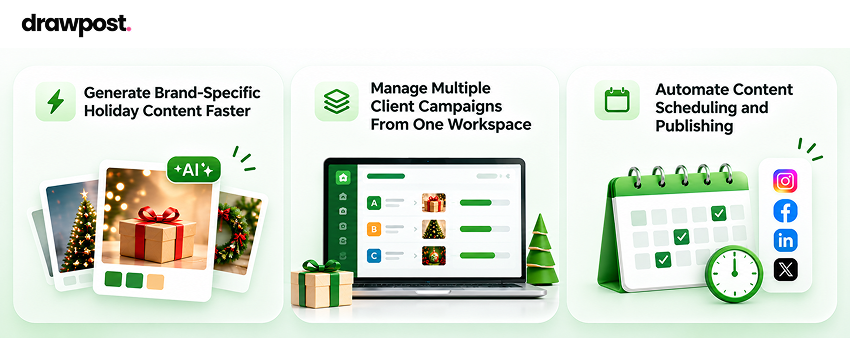
Generate Brand-Specific Holiday Content Faster
Generic AI-generated content often sounds interchangeable. A luxury skincare brand, neighborhood restaurant, and enterprise software company should not communicate with customers in the same way simply because they are celebrating Christmas.
Effective AI-assisted content creation requires brand context. DrawPost’s AI social media management platform helps teams create content using information about each brand’s positioning, audience, voice, and visual preferences.
Agencies can use those inputs to develop holiday captions, visuals, and campaign ideas while maintaining distinct messaging for different clients. Human review remains essential for promotional accuracy, creative differentiation, and any claims that require verification.
Manage Multiple Client Campaigns From One Workspace
Multi-client social media management becomes harder when every brand requires a separate collection of planning, creation, and scheduling tools. A connected workspace can make operations more manageable.
DrawPost supports dedicated client profiles and multi-brand environments, allowing agencies to organize separate content directions and publishing activities within one management platform. For example, an agency could prepare a holiday product campaign for a retailer while separately organizing year-end thought leadership posts for a B2B client.
Each campaign retains its own brand context and schedule. This helps reduce repetitive setup and makes it easier to maintain visibility as the number of managed accounts increases.
Automate Content Scheduling and Publishing
Content automation becomes particularly valuable when teams are managing multiple publishing calendars during holiday closures.
DrawPost’s publishing platform supports scheduling and automated publication across connected channels, including Instagram, Facebook, LinkedIn, X, and YouTube. Its Autopilot capability can generate and schedule upcoming content around configured brand information and publishing preferences.
Agencies can review and refine content before it goes live, helping them retain control over the final message. A connected workflow also reduces the need to move finished content between separate generation and scheduling applications.
The practical benefit is greater consistency: teams can plan holiday campaigns in advance, prepare the required content, and maintain publishing schedules while concentrating on client relationships and campaign performance.
Want to simplify holiday campaign planning across multiple clients?
Explore DrawPost to organize brand content, create campaign posts, and schedule publishing across connected social channels.
Best Practices for Managing Multiple Holiday Campaigns
A structured workflow provides the foundation, but a few operational practices can make holiday campaign execution significantly more reliable.
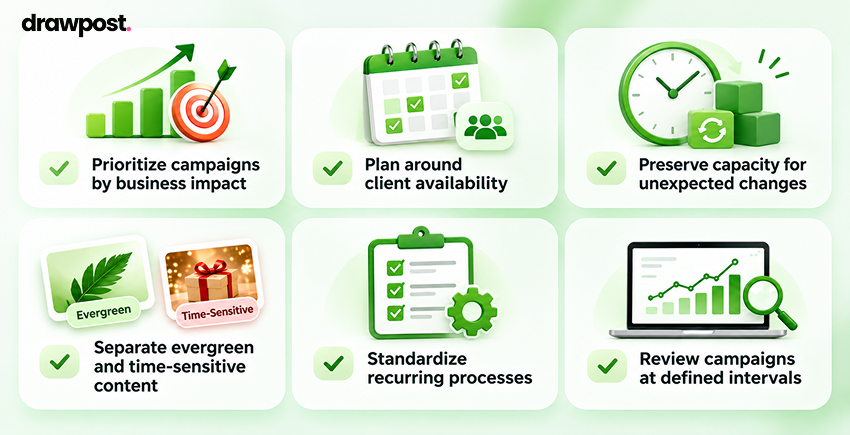
1. Prioritize campaigns by business impact: Not every post requires the same level of urgency. Give critical promotional launches and time-sensitive announcements priority over routine content.
2. Plan around client availability: Request promotional details and approvals before holiday closures. Keep backup contacts available for urgent decisions.
3. Preserve capacity for unexpected changes: Avoid filling the entire production calendar. Leave some room for revised offers, new announcements, and last-minute opportunities.
4. Separate evergreen and time-sensitive content: Educational or brand-awareness posts may remain relevant for weeks. Promotional content requires more careful monitoring because pricing, inventory, and deadlines can change.
5. Standardize recurring processes: Use consistent campaign briefs, asset naming conventions, review stages, and prepublishing checks across clients.
6. Review campaigns at defined intervals: Daily operational checks may be appropriate during major promotional periods, while broader performance reviews can take place weekly.
These practices also create a stronger foundation for future holiday campaigns. For example, lessons from a Black Friday social media strategy can improve subsequent Christmas promotions. Similarly, high-performing Christmas social media marketing ideas can inform next year’s creative planning.
The broader objective is to create a repeatable operating model that becomes more effective as the agency grows.
Holiday Social Media Campaign Management Checklist
Before launching multiple holiday campaigns, use this checklist to verify that essential activities are covered.
Before the campaign
- Confirm objectives and KPIs for every client.
- Identify relevant holidays and promotional deadlines.
- Finalize campaign briefs and brand guidelines.
- Build individual and agency-wide content calendars.
- Prepare captions, visuals, links, and promotional assets.
- Collect client approvals before scheduling.
- Confirm publishing permissions and connected accounts.
During the campaign
- Monitor scheduled and published content.
- Check promotional offers and landing page links.
- Track engagement, traffic, and conversions.
- Coordinate revisions and last-minute requests.
- Respond to failed or delayed publications.
After the campaign
- Prepare individual client performance reports.
- Document successful content formats and messages.
- Identify workflow delays and improvement opportunities.
- Save reusable campaign assets and planning templates.
A consistent checklist helps agencies maintain campaign quality even when workloads and deadlines increase.
Conclusion
Managing multiple client social media campaigns during the holidays should not mean juggling disconnected tools, rushing approvals, or spending every evening preparing tomorrow’s posts.
The most effective agencies establish a consistent process: define client priorities, organize campaign calendars, maintain distinct brand identities, batch content production, secure approvals, automate scheduling, and monitor results.
AI automation can make that process easier to scale. With DrawPost, agencies can bring brand-specific content creation, multi-client organization, and social media scheduling into a more connected workflow.
The result is more time for the work that requires human expertise: developing stronger campaign strategies, understanding audiences, and delivering better client experiences.
Frequently Asked Questions
Q. How Do You Manage Social Media for Multiple Clients During the Holidays?
Managing multiple clients effectively requires individual campaign goals, dedicated content calendars, clear approval processes, and centralized scheduling. Agencies should prepare holiday content early, assign responsibilities, and monitor publishing activity across accounts. AI-assisted tools can reduce repetitive content creation and scheduling tasks, while human reviewers maintain control over brand messaging, promotional accuracy, and campaign decisions.
Q. How Can Agencies Plan Holiday Social Media Campaigns for Different Clients?
Agencies should begin by understanding each client’s target audience, business objectives, promotional calendar, and brand identity. Next, they can create campaign-specific content plans, organize production deadlines, and establish approval schedules. A centralized calendar provides visibility across clients while separate brand workspaces help maintain distinct messaging. Planning several weeks ahead can also reduce last-minute production pressure.
Q. How Do You Organize Social Media Content Calendars for Multiple Clients?
The most practical approach is to maintain separate calendars for individual clients alongside an agency-wide overview. Each calendar should include publishing dates, channels, campaign themes, content formats, approval status, and assigned responsibilities. Using consistent naming conventions and scheduling workflows helps agencies identify conflicting deadlines, coordinate resources, and prevent content from being published to the wrong accounts.
Q. How Can Social Media Managers Handle Multiple Holiday Campaigns at Once?
Social media managers can handle overlapping campaigns by prioritizing time-sensitive promotions, batching similar content tasks, scheduling approved posts in advance, and establishing clear approval deadlines. Centralized campaign visibility helps teams manage workloads, while automation reduces repetitive publishing activities. Regular performance checks and backup plans also make it easier to respond to unexpected changes during busy holiday periods.
Q. What Tools Help Agencies Manage Multiple Client Social Media Campaigns?
Agencies benefit from tools that combine content planning, brand organization, AI-assisted creation, publishing schedules, and performance insights. DrawPost is one option for teams managing several brands, offering separate client workspaces, AI-generated captions and visuals, content calendars, and cross-platform scheduling. The right platform should support existing approval requirements and reduce manual coordination without compromising brand consistency.
Our Latest Insights

In-House vs. Outsourced Social Media Management vs. AI Tools: Which Is More Cost-Effective?
Compare in-house vs. outsourced social media management and AI tools. Explore costs, pricing, ROI, and how to choose the most cost-effective approach.

Christmas Social Media Marketing Ideas for Businesses in 2026
Explore practical Christmas social media marketing ideas for businesses in 2026, including content, campaigns, deadlines, platforms, and measurement.

Black Friday 2026 Social Media Strategy: Content Ideas & Planning
Discover how to plan a Black Friday 2026 social media strategy with campaign ideas, a content calendar, platform tips, and AI scheduling tools.