Table of Contents
A customer sees your Christmas offer on Instagram, clicks through, and cannot find the advertised package. Another asks whether an order will arrive before December 25, but receives no clear answer.
Christmas social media content should close those gaps. Customers need help choosing an offer, understanding its value, and completing the purchase. Businesses need to decide which products or services deserve promotion and keep the information accurate as availability changes.
This guide shares Christmas social media marketing ideas for businesses planning their 2026 campaigns. It explains what to post, how to connect those posts to a commercial goal, and what to review before committing more time or budget.
Key Takeaways
- Define your Christmas campaign goal before choosing posts, platforms, or promotional offers.
- Create gift guides that help customers compare options by recipient, budget, and purpose.
- Use demonstrations and package comparisons to answer buying questions before customers commit.
- Plan posts around confirmed deadlines, then shift attention to options customers can still purchase.
- Use DrawPost to create branded content, organize your calendar, and schedule approved posts.
- Measure purchases, bookings, and qualified inquiries to identify which content supports business results.
Choose Your Christmas Campaign Goal Before Creating Content
Decide what you want customers to do after seeing your content. Set a goal such as product purchases, event reservations, or corporate gifting inquiries. This helps your team decide what to promote and what information to include.
Your campaign could focus on:
- Selling products from a Christmas collection.
- Increasing festive dining or event reservations.
- Generating inquiries about corporate gifting.
- Encouraging purchases from existing customers.
- Bringing more shoppers into selected stores.
- Securing service bookings for the new year.
A clothing brand promoting its Christmas collection could focus on helping customers choose outfits for holiday events. A styling video can show how the pieces look together. A follow-up carousel can suggest outfits for office parties or family celebrations, with links to the featured products.
A corporate gifting supplier needs to answer different questions. Buyers may want to compare packages, check branding options, and understand minimum order quantities. Build posts around those details, then direct interested buyers to request a quote with their quantity and delivery requirements.
Choose Christmas marketing ideas for businesses that answer your customers’ buying questions. Before creating the posts, confirm that the featured offer is available and the linked page provides accurate prices, relevant details, and clear ordering instructions.
Christmas Social Media Post Ideas for 2026
Choose ideas that solve a real buying question or give your audience a relevant reason to participate. You do not need every idea in one campaign.
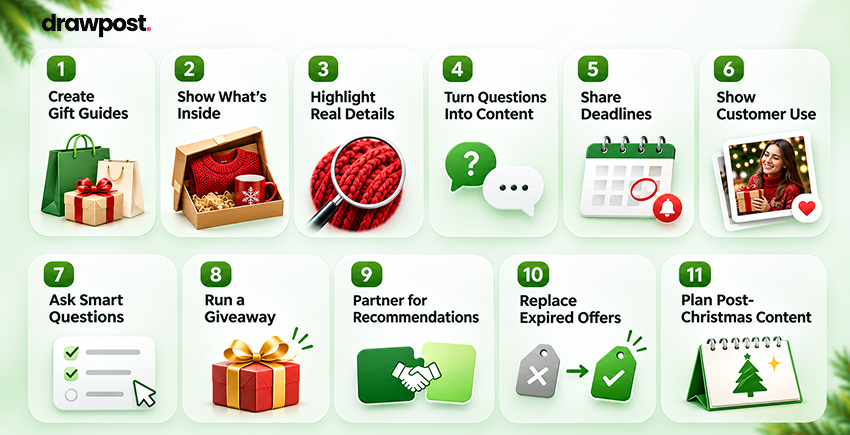
1. Create Gift Guides for Specific Buyers
A guide called “Christmas Gifts for Clients Under $100” gives a buyer a clear starting point. Organize recommendations by recipient, budget, or purpose rather than presenting the entire catalog.
For corporate buyers, include details such as branding options and minimum quantities. For individual shoppers, explain who each product suits and whether gift packaging is available.
Post concept: A carousel featuring five gifts for remote employees, with the price and a short reason to choose each one. Link to the products featured in the guide.
2. Show Exactly What a Package Includes
Bundles and experience packages need a clear explanation. A photograph of a gift box does not tell customers whether the price includes every item shown.
Show the contents and explain the choices available. A hotel promoting a Christmas stay should specify which meals are included and whether the package price applies to one or two guests.
Before promoting the offer, check:
- The items or services included.
- Optional extras and additional charges.
- Applicable dates and participating locations.
- Packaging, delivery, and fulfillment costs.
Assess Christmas promotional ideas against the value customers receive and the margin the business retains.
Post concept: Show a Christmas hamper unpacked across three slides: the full package, a close-up of the contents, and the available upgrades. State which items cost extra.
3. Demonstrate the Detail Customers Cannot Judge Online
Use short videos to answer questions that photographs leave unresolved. A gift retailer could show whether a package arrives ready to give. A personalized stationery brand might demonstrate how a company logo looks on the finished notebook.
Focus on one question per video. Show the relevant detail clearly, then direct viewers to specifications or available options.
For a service business, demonstrate the experience. A venue walkthrough can show the seating arrangement and atmosphere more clearly than a list of features.
Post concept: Film the same gift with standard and premium wrapping. Show each finish close up, then explain the price difference and how buyers select their preference.
4. Turn Sales Questions Into Content
Ask customer service and sales teams what buyers want to know before committing. Those conversations provide useful Christmas content ideas for brands because they reveal where people hesitate.
Potential posts include:
- How to order gifts for several addresses.
- What a personalized order requires.
- Whether a package suits larger groups.
- How gift recipients make a booking.
- Which products qualify for store collection.
Answer one question at a time. Include the practical detail, such as preparation time or the information customers need to submit, and link to the relevant instructions.
5. Publish Deadlines Customers Can Act On
“Order soon” gives customers little information. State the confirmed deadline and explain which products, services, or locations it covers.
Put the essential details in the visual as well as the caption. Separate standard delivery from personalization or collection if the cutoffs differ.
Use this structure: What is available, when customers must act, where the deadline applies, and how to order.
Assign someone to remove or update the reminder once its deadline passes. Prepare the replacement options described below before the cutoff arrives.
6. Show How Customers Have Used Your Offer
A customer story can help buyers understand whether the offer suits their needs. A corporate gifting provider could feature an approved Christmas order prepared for employees across several offices.
Explain the relevant choices: what the client selected, which requirements mattered, and how the order was arranged. Use details the customer has approved.
Keep the story connected to a current product or service. Readers considering a similar purchase should know where to find more information.
Post concept: With the client’s permission, show the selected gift, branded packaging, and delivery preparation. Explain the actual ordering requirements without exposing employee addresses or claiming outcomes you cannot substantiate.
7. Ask Questions That Help You Recommend Products
Give customers a reason to respond beyond adding a comment. A homeware brand could run a “Who’s hardest to buy for?” Story poll with options for a host, a colleague, or a family member, then publish recommendations for the most-selected recipient.
A question is more useful when the business acts on the answers. Use responses to shape the next gift guide or explain a product category that attracts interest.
Avoid treating every response as evidence of demand. Check whether the subject also produces relevant visits, inquiries, or purchases.
8. Run a Giveaway Connected to Your Business
Choose a prize that appeals to potential customers. A kitchenware company could offer a holiday baking set, while a hospitality brand could feature an experience at a participating property.
When evaluating Christmas giveaway ideas for businesses, decide what happens after people enter. Prepare relevant follow-up posts so new followers can understand the wider offer.
Assign responsibility for questions, winner communication, and checking the promotion rules that apply in your location and on the chosen platform. Publish clear entry conditions before launch, then assess audience relevance alongside participation.
9. Create a Joint Recommendation With a Partner
Choose a partner whose offer complements yours. A tableware retailer and local food business could publish a Christmas hosting guide. A shopping destination could feature gift recommendations from participating retailers.
The content needs a useful connection between the businesses. Explain why the recommendations belong together and give readers a clear route to each offer.
If the partnership includes a joint package, agree on payment and fulfillment responsibilities before promoting it. Otherwise, keep the collaboration to shared recommendations.
Post concept: Create a “Christmas Dinner, Ready to Host” carousel pairing serving pieces with prepared dishes. Identify the business selling each item and provide separate ordering instructions if customers must purchase independently.
10. Replace Expired Offers With Available Options
Prepare content for the point when Christmas delivery closes. Digital gifts, local pickup, and future experiences may still be available, depending on the business.
Explain how customers receive the purchase and how the recipient uses it. Gift card content should direct buyers to redemption details and applicable conditions.
For businesses serving several regions, check availability locally. A collection offer that works in one city may be irrelevant to customers elsewhere.
11. Plan Content for Customers After Christmas
Customers may need help once they receive a product or experience. Publish setup guides, care instructions, or advice on making a reservation.
A technology brand could explain the first steps for using a device. A hospitality business could show gift recipients how to select their preferred date.
This content also gives new customers a reason to stay connected. Introduce a related purchase when it serves a clear need, rather than immediately repeating another sales offer.
Choose Christmas Campaigns Your Team Can Deliver
Choose a few related ideas from the list above and build a campaign around one offer. A gift guide, product demonstration, and ordering reminder can form a short series without requiring a new concept for every post.
Before committing to a campaign, check three things:
- Content available: Do you have approved product images, prices, and enough information to explain the offer?
- People responsible: Who will prepare posts, approve them, and answer customer questions?
- Capacity to fulfill: Can the business handle the orders or bookings the campaign promotes?
Choose Christmas social media campaign ideas your team can maintain through the holiday period. A daily countdown needs enough useful material for every installment. A giveaway needs someone to manage entries and winner communication.
For teams with limited resources, effective Christmas social media ideas for small businesses can start with three posts: help buyers choose, show what they receive, and explain how to order. Add content when customer questions reveal a clear need.
Build Your Calendar Around Real Christmas Buying Deadlines
Confirm the dates that affect when customers can order or book. These may differ by product, delivery region, or service. Personalized corporate gifts, for example, may require an earlier cutoff than products already available in-store.
Use the following calendar as a planning framework for Christmas 2026. Start earlier where customization, procurement approvals, or group bookings require a longer buying window. The dates below organize content; they do not replace your confirmed fulfillment deadlines.
| Timing | Customer need | Content to prepare | Intended action |
| November, or earlier for longer buying cycles | Explore suitable options | Gift guides, collection previews, corporate package comparisons | View the range or request a quote |
| Early December, while ordering remains open | Compare and choose | Product demonstrations, package explanations, approved customer examples | Select a package or submit requirements |
| Before each confirmed cutoff | Understand when to act | Product-specific delivery, personalization, collection, or booking reminders | Complete the order or reservation |
| After each cutoff through December 24 | Find an option still available | Verified local pickup, digital gifts, or future experiences | Buy an available alternative |
| December 25 to 31 | Use or redeem the gift | Setup guidance, care instructions, and redemption walkthroughs | Activate the product or book the experience |
Apply social media scheduling best practices by assigning approval owners and reviewing queued posts whenever offers or delivery arrangements change. Keep one current source for prices, links, and deadlines so everyone approves content against the same information.
Adapt Your Christmas Content to Each Social Platform
Keep the offer consistent, but change the information and format according to the audience. A corporate gift package can support several posts without repeating the same caption across every account.
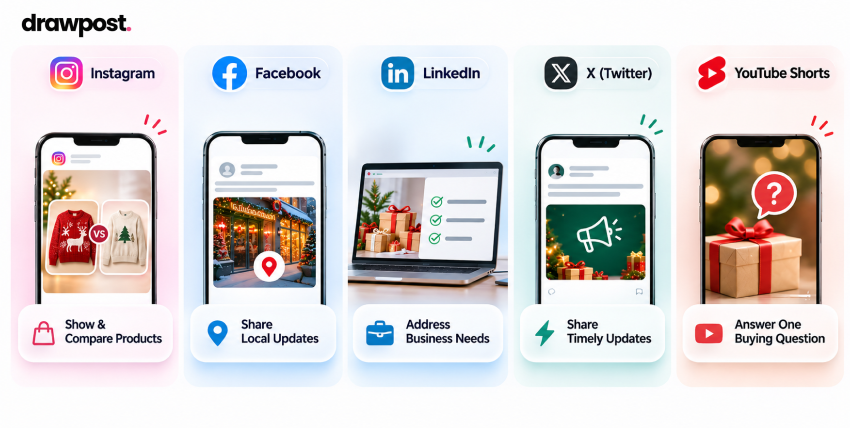
Instagram: Show the Product and Help Customers Compare
Use carousels when buyers need to compare gifts, packages, or price ranges. Put one option on each slide and explain who it suits. Keep essential details visible rather than placing every condition at the end of a long caption.
Useful Christmas Instagram post ideas include a Reel showing personalized packaging and a carousel comparing gifts at different price points. Stories can carry timely availability updates and answers to common questions.
A corporate gifting business could show the finished box in a Reel, compare package contents in a carousel, and answer customization questions through Stories. Each format adds information to the same campaign.
Facebook: Make Local Information Easy to Find
Use Facebook posts to explain details that influence visits, collection, or reservations. Include the relevant location, opening hours, purchase link, and any conditions customers need to know.
For businesses with several branches, prepare shared campaign content while allowing each location to confirm its own availability. A local collection post should name the participating store so customers know where to go.
A hotel promoting festive dining could publish the menu and booking information, then follow with answers about group sizes or dietary requirements. Update the post when availability changes, and make sure someone monitors questions.
LinkedIn: Address the Business Buyer’s Requirements
Give Christmas content a clear connection to the reader’s responsibilities. Corporate gifting, employee appreciation, and client events may involve budgets, approval processes, and delivery requirements.
A corporate gifting supplier could publish a document post comparing packages for different team sizes. A consulting firm might share a year-end client appreciation message with an approved example of the work delivered, keeping any sales invitation relevant and discreet.
Show evidence where appropriate. An approved customer example can explain how an order was arranged across several offices. Finish with a relevant action, such as viewing corporate packages or submitting an inquiry.
X (Twitter): Keep Updates Focused and Timely
Use X for concise announcements, availability changes, and direct answers to buying questions. Give each post one main message so customers can understand the update quickly.
A delivery reminder should identify the affected offer and deadline, then link to the full details. If ordering conditions require more explanation, use a short thread with a clear opening post.
Monitor replies during active promotions. Use recurring questions to improve later posts. When an offer expires, update any pinned promotional message so visitors see a current option.
YouTube Shorts: Answer One Christmas Buying Question
Use YouTube Shorts when a brief demonstration adds more value than another product photograph. Show a gift box opening, a personalization process, or the setup for a Christmas experience.
A retailer could film “What arrives in our employee gift box?” Begin with the finished package, reveal the contents, and finish with the product name and where to find ordering details. Use readable captions so the demonstration remains understandable without sound.
Keep the video focused on one question. Film with accurate products and packaging, then adapt the footage for other suitable short-video channels rather than uploading identical copy everywhere.
Across platforms, festive social media content should remain recognizable as your brand. Adapt the presentation while keeping prices, conditions, and purchase instructions consistent.
Use DrawPost to Prepare Your Christmas Content Calendar
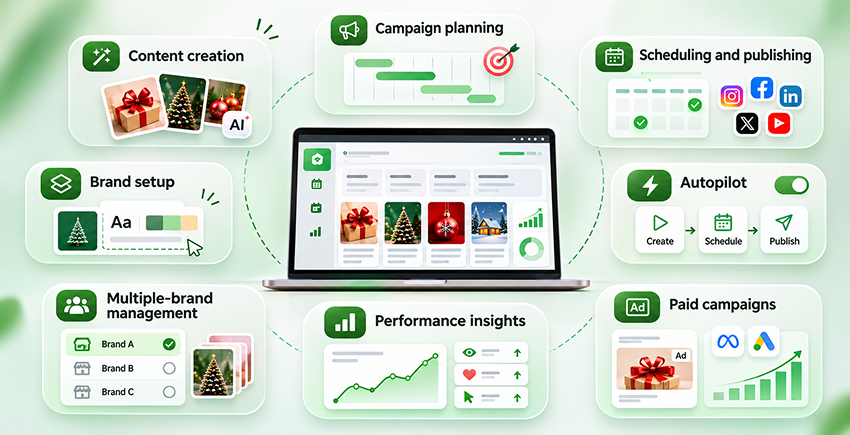
DrawPost: an ai-powered social media tool offers content creation, planning, publishing, and performance review services. Use it to organize the approved campaign around your brand, audience, offers, and selected channels.
Consider a corporate gifting supplier preparing three posts: a gift-guide carousel, a package explanation, and an ordering reminder. The team can use the same brand context to generate drafts, adapt the presentation for selected channels, and arrange approved content in the calendar.
Its main features support the following work:
- Brand setup: Build context from your website, Brand Kit, audience, positioning, reference images, and keywords.
- Content creation: Generate captions and visuals for formats including images, carousels, video, and Stories. Use approved product photography where buyers need to judge the exact gift or packaging.
- Campaign planning: Prepare coordinated content for your Christmas range, gifting packages, or seasonal bookings.
- Scheduling and publishing: Arrange approved posts in a visual calendar and publish supported formats across connected Instagram, Facebook, LinkedIn, X, and YouTube accounts, including YouTube Shorts.
- Autopilot: Generate and schedule upcoming content around the brand profile, content plan, and publishing frequency.
- Multiple-brand management: Manage multiple social media accounts while keeping client profiles, brand identities, campaigns, and calendars separate.
- Performance insights: Review channel analytics, competitor content, trend signals, and Google Analytics visibility alongside your own order and inquiry records.
- Paid campaigns: Create and manage Meta and Google Ads workflows, with review before activation.
For businesses looking to automate social media for small businesses, agencies, and entrprises, this connects preparation and scheduling in one workflow. Keep customer replies and changes to offers under human supervision.
Before publication, confirm prices, product accuracy, links, and deadlines. In the gifting example, someone must still verify the contents of each package and the last date for branded orders; content generation does not establish those facts.
Measure Which Christmas Posts Produce Useful Business Results
Measure the action your campaign was intended to generate. Review a product campaign against purchases. Assess a reservation campaign against confirmed bookings. A B2B campaign should track relevant inquiries and the orders they produce.
Use campaign links or offer codes where practical. Compare social media reporting with sales and booking records to understand what happens after people leave the platform. These methods can help identify tracked responses, but they may not capture every sale that social content influenced.
When results fall short, investigate the point where customers stop:
- People see the post but do not visit: Check whether the offer is relevant and the next step is clear.
- People visit but do not purchase: Review availability, delivery information, pricing, and the buying process.
- The same questions keep appearing: Add the missing information to the post and destination page.
- Inquiries do not match your offer: Review whether the content addresses the intended audience.
Use these checks to improve the campaign while it is running. Assess holiday engagement strategies, such as polls and giveaways, separately: participation matters more when it comes from relevant potential customers and leads to useful follow-up.
Review production time and promotional spending as well. Record which content generated useful results so next year’s plan reflects your own campaign evidence.
Ready to Plan Your Christmas Social Content?
Turn your seasonal offers into branded posts with DrawPost. Create content, organize your calendar, and schedule approved posts around your confirmed buying deadlines.
FAQs
Q. What should businesses post on social media for Christmas?
Publish content that helps customers choose and purchase relevant products or services. Gift guides, package explanations, demonstrations, customer stories, and buying FAQs can all serve a purpose. Add deadline reminders when they affect the purchase. Choose posts according to your audience’s questions, and direct customers to a page that confirms current prices, availability, and the steps required to order or book.
Q. How can businesses use social media for Christmas marketing?
Choose a seasonal offer and define the action you want customers to take. Build a sequence that introduces the offer, explains its value, answers buying questions, and communicates relevant deadlines. Adapt the presentation for each platform while keeping commercial details consistent. Review responses during the campaign, then update posts or purchase pages when customers reveal missing information that affects their buying decisions.
Q. When should businesses start Christmas social media marketing?
Start planning early enough to allow for content production, approvals, and the customer’s buying process. Corporate gifting and group reservations may need longer lead times than individual purchases. Work backward from confirmed ordering or booking deadlines. If you begin in November, prioritize approved offers and essential buying information, then add reminders and availability updates as the relevant cutoff dates approach for your business.
Q. What are the best Christmas social media campaign ideas for 2026?
The right choice depends on what the business sells and what customers need to decide. Retailers can use gift guides and demonstrations. Hospitality businesses can explain packages and reservation options. B2B suppliers can address corporate ordering requirements. Evaluate Christmas social media campaign ideas by their relevance, production requirements, and ability to lead customers toward a purchase, booking, or qualified inquiry during the season.
Q. How can small businesses increase Christmas sales through social media?
Focus on an offer the business can fulfill profitably. Explain who it suits, show what customers receive, and provide a direct purchase or booking link. Use existing product assets and turn common questions into posts. Communicate confirmed deadlines, then promote available alternatives afterward. Track orders and inquiries so limited production time goes toward content that attracts relevant customers and helps them take action.
Our Latest Insights
Black Friday 2026 Social Media Strategy: Content Ideas & Planning
Discover how to plan a Black Friday 2026 social media strategy with campaign ideas, a content calendar, platform tips, and AI scheduling tools.

9 Ways AI Can Improve Your Social Media Content Strategy
Discover 9 ways AI can improve your social media content strategy, from content planning and creation to scheduling, brand consistency, and analytics.

How to Maintain a Consistent Brand Voice Across Social Media?
Learn how to maintain a consistent brand voice across social media with practical guidelines, platform-specific strategies, team workflows, and AI tools.