Table of Contents
Social media marketing is part of how businesses stay visible. A local firm might use it to answer customer questions. An established brand might use it to explain what’s changing in its products. Both have a reason to show up where their customers already spend time.
So why do some accounts start conversations while others publish every week and hear little back?
- Why do some campaigns get attention but lead to few inquiries?
- Why do buyers respond to a competitor’s posts and scroll past yours?
- Are you answering the questions people leave in your comments and messages?
- Can customers get what your posts promise once they click through?
These questions can help you spot social media management mistakes in your everyday work. A vague post can leave buyers unsure what you offer. A missed reply can cost you a conversation. Review the last month of posts and look for the problems that keep coming up. Here are ten to check and what you can do about each one.
10 Social Media Management Mistakes and How to Fix Them
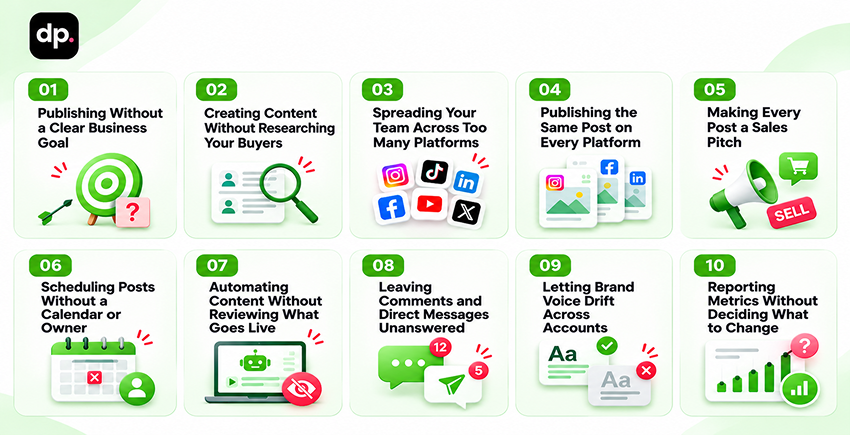
Start with the mistake you see most often. Fix it in your next publishing cycle and see what changes before you move on.
01. Publishing Without a Clear Business Goal
Ask two people what last week’s campaign was supposed to do. One says it was meant to get the company in front of new buyers. The other expected demo requests. Both can look at the same numbers and come away with a different answer.
Of all the social media strategy mistakes, this one is worth catching before anyone writes a post. Agree on what a buyer should know or do after seeing the campaign.
Before approving a campaign, agree on three things:
- Buyer and decision: Name the person you want to reach and the decision they’re trying to make.
- Content: Decide what would help them make that decision. Give the writer one question to answer.
- Measure: Choose a signal that fits the goal. If you want more people to consider the product, track visits to a relevant product page. If you want inquiries, track the requests that follow and check whether they match what you sell.
02. Creating Content Without Researching Your Buyers
If your team plans content around internal talking points, it’s easy to miss the questions buyers bring to sales calls. Those questions tell you where people need more detail before they can decide whether your product fits.
Start your target audience research with the people who hear those questions. Ask sales which objections stall deals. Ask customer success what trips people up during onboarding. Keep the buyer’s wording in your notes. It gives the writer a much clearer brief than a topic like “enterprise flexibility.”
Bring five questions to your next planning meeting. Pick one that comes up often and ask someone who answers it regularly to help write the post. Once it goes live, give sales the link.
03. Spreading Your Team Across Too Many Platforms
You posted daily on three accounts during launch week. Two went quiet once the campaign ended. Even when those accounts sit idle, someone still has to check their messages and keep the contact details current.
Before planning another month of posts, ask how many hours each account takes and what those hours buy you.
| Channel decision | Evidence to look for | What to do next |
| Maintain | Target buyers use the channel and the team can support it | Assign a recurring format and a named owner |
| Test | Buyer activity looks promising, but results are sparse | Run one focused series and review relevant interactions |
| Reduce | Production takes time and few target buyers respond | Lower cadence and keep a current contact link visible |
Before you add a channel, decide which existing work it will replace. Give the trial an end date so you can check whether it justifies the extra hours.
04. Publishing the Same Post on Every Platform
Copying a caption between platforms saves time. It can also bury the point when the reader sees the post in a different format. Check what appears first on each account before you schedule it.
For cross-platform publishing, keep the approved facts in one brief. Change the opening and the format to fit how people will see the post.
Here’s how an enterprise software company could adapt a single sign-on announcement.
| Platform | What the reader needs | What to publish |
| Why the change matters to IT operations | A short explanation of how centralized access changes onboarding | |
| YouTube | How the setup works in practice | A walkthrough from identity provider configuration through first login |
Ask the reviewer to check each version in its final format and open its destination link before scheduling.
05. Making Every Post a Sales Pitch
Count how many of your last ten posts end with “book a demo.” If most do, look at what buyers learn before they reach the button.
This is one of the social media content mistakes you can catch while reviewing drafts. Give each post a question to answer and an action that makes sense for someone asking it.
- Help buyers recognize a problem. Share a checklist they can use to see whether the issue applies to them.
- Help them compare options. Explain what each approach requires and when it makes sense.
- Help them evaluate your offer. Share a customer result they can read in context. Ask for a demo when the post gives them a reason to take that step.
06. Scheduling Posts Without a Calendar or Owner
Check your upcoming queue for posts with a publish date and no reviewer. Each one can hold up a launch, especially when the copy or artwork still needs sign-off.
Most social media scheduling mistakes start with a missing date, owner, or approval. Give each post one record in a shared social media content calendar so the team knows where to check.
1. Confirm the timing. Check the channel, date, time zone, and any dependency such as a landing page.
2. Confirm the handoff. Name the publishing owner and reviewer. Give the reviewer a deadline and a link to the final assets.
3. Check the queue. Update affected posts when a launch moves. Keep a small set of approved evergreen drafts to protect posting consistency.
Set a cadence the team can sustain using these social media scheduling best practices.
07. Automating Content Without Reviewing What Goes Live
Review AI drafts before they enter the publishing queue. A fluent caption can still contain an old price or a release date the product team hasn’t confirmed.
Many social media automation mistakes start with an unchecked detail. Who can confirm that detail before the post goes live?
| Post type | Check before publishing |
| Event reminder | Date, time zone, and registration link |
| Feature announcement | Release date, availability, and eligible plans |
| Customer result | Source for the figure and permission to publish |
Give AI dated source material and approved terminology. Have a reviewer check the final post and open its links. Assign someone to pause the queue when pricing, availability, or incident communications change. See how an AI social media manager works for ways to fit review into the workflow.
08. Leaving Comments and Direct Messages Unanswered
Check the oldest unanswered message in each inbox. If nobody knows who should reply, the same thing can happen to the next buyer. A message needs an owner even when the answer has to come from another team.
Put one person in charge of community management for each account. Give them a backup and agree on when they’ll check the inbox. If an engineer needs to answer a question, the inbox owner can reply with a time to expect an update. They should also check that the engineer’s answer reaches the buyer.
Review open threads once a week. Send account issues to support and handle customer details in private. Bring recurring questions to the next planning meeting so the team can answer them in a post or update the product FAQ.
09. Letting Brand Voice Drift Across Accounts
Read the company page and a recent post from someone who writes about the product. If they describe the offer in different terms, a buyer may wonder whether they’re looking at the same thing. Check what writers receive before they start drafting.
Keep a one-page guide for brand voice consistency. Show the terms you use, the claims you can back up, and what a good post sounds like. An account that writes for technical readers can say “role-based access.” A broader account can spell out who can see or approve a purchase. Both should describe the same feature.
If an editor keeps changing the same phrase, ask why. Put the original and the revised line in the guide so the next writer can see the decision in context. See how to maintain a consistent brand voice across social media.
10. Reporting Metrics Without Deciding What to Change
The monthly report says clicks fell. Which post will you make differently next month? If the report can’t help you answer that question, start with what you wanted buyers to do.
Use social media analytics to compare posts that had the same job. Say you wanted readers to check whether your product supported an integration. The launch announcement had more organic social media reach. Two setup walkthroughs sent more people to the documentation. That gives you a reason to try another walkthrough. Show the finished setup in the opening, keep the same link, and compare visits to the documentation.
Write down who will run the test and when you’ll review it. Compare posts on the same channel where you can. Keep track of paid promotion so a bigger distribution budget doesn’t look like a better topic. If you only have a handful of clicks, read the comments and buyer questions before you commit to a new series.
How to Audit and Fix Your Social Media Workflow
Open the last 30 days of posts, drafts, comments, and direct messages. Ask whoever runs the calendar and whoever answers buyers to join the review. Bring a few recurring sales questions so you can check whether your content answers any of them.
| Review Area | Evidence to Check | First Corrective Action |
| Goals and buyer fit | Campaign briefs and recurring sales questions | Give the next campaign one buyer question to answer |
| Channel investment | Time spent per channel and relevant buyer activity | Reduce coverage on one account with weak evidence |
| Publishing | Late approvals, missed dates, and broken links | Name a publishing owner and set approval deadlines |
| AI review | Corrections, unsupported claims, and paused posts | Route high-risk claims to a subject-matter reviewer |
| Buyer conversations | Unanswered questions and unresolved handoffs | Assign inbox coverage and response windows |
| Performance | Last month’s report and decisions made from it | Choose one test and set a review date |
Pick two problems you can fix this month. Start with the issues that cost the team the most time or keep buyers waiting. Assign an owner, write down the change, and record the starting point so you can see whether it helped.
Check in after two weeks. At the end of the month, compare the numbers with your starting point and decide what to change next. If the team ran out of drafts, use this guide to create 30 days of social media content with AI. Review the drafts before they enter the queue.
Manage Your Social Media With DrawPost
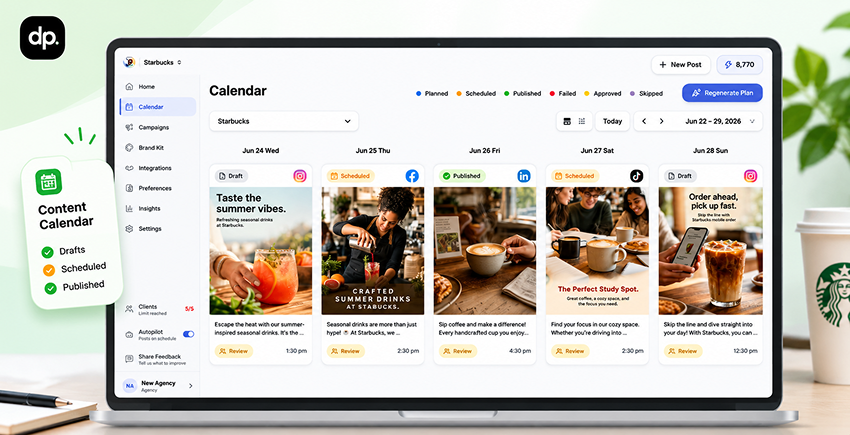
If your team keeps digging through chat for the latest draft, move that work into one place. DrawPost’s AI social media management tool uses your brand profile to help draft captions and visuals. You can organize drafts in a visual calendar and schedule approved posts across connected accounts.
Start with one brand and one campaign. Add your audience, preferred product language, and visual references. Build a week of posts around a buyer question, review the drafts, and schedule the approved versions. After the posts go live, check how they performed before you plan the next week.
Ready to plan your next week of posts?
Set up your brand in DrawPost and turn one campaign idea into a week of posts you can review and schedule.
FAQs
Q. What are the most common social media management mistakes?
Common mistakes include publishing without a business goal, guessing what buyers care about, and running more accounts than the team can support. Others include copying posts across platforms, skipping AI review, and leaving buyer questions unanswered. Review a month of posts and messages to see which problems repeat. Start with the one that most often delays publishing or interrupts a conversation with a potential customer.
Q. Why is my brand getting low engagement on social media?
If audience engagement drops, check who saw your posts and whether the topic comes up in buyer conversations. Then read the opening. If it takes several lines to reach the point, try moving the example or answer up. Compare similar posts on the same channel and check who interacted. If a technical walkthrough earns saves from target buyers while a broad announcement draws little response, test another walkthrough on a related question before changing your entire strategy.
Q. How do social media management mistakes affect brand growth?
They make it harder for buyers to recognize your expertise, understand your offering, and get answers when they’re evaluating it. Inconsistent publishing reduces opportunities to hear from your brand. Unsupported claims and missed replies can create extra work for sales or support. Track outcomes that match the problem you’re fixing, such as faster responses to technical inquiries or more qualified visits to a product resource.
Our Latest Insights

AI Social Media Manager vs. Human Social Media Manager: Which Should Businesses Choose in 2027?
Compare AI and human social media managers in 2027, including capabilities, costs, benefits, limitations, and the best approach for businesses.

How to Manage Multiple Client Social Media Campaigns During the Holidays
Discover how marketing agencies can streamline multiple client social media campaigns during the holidays with workflows, batching, and automation tools.

In-House vs. Outsourced Social Media Management vs. AI Tools: Which Is More Cost-Effective?
Compare in-house vs. outsourced social media management and AI tools. Explore costs, pricing, ROI, and how to choose the most cost-effective approach.